Multi RS

Battery

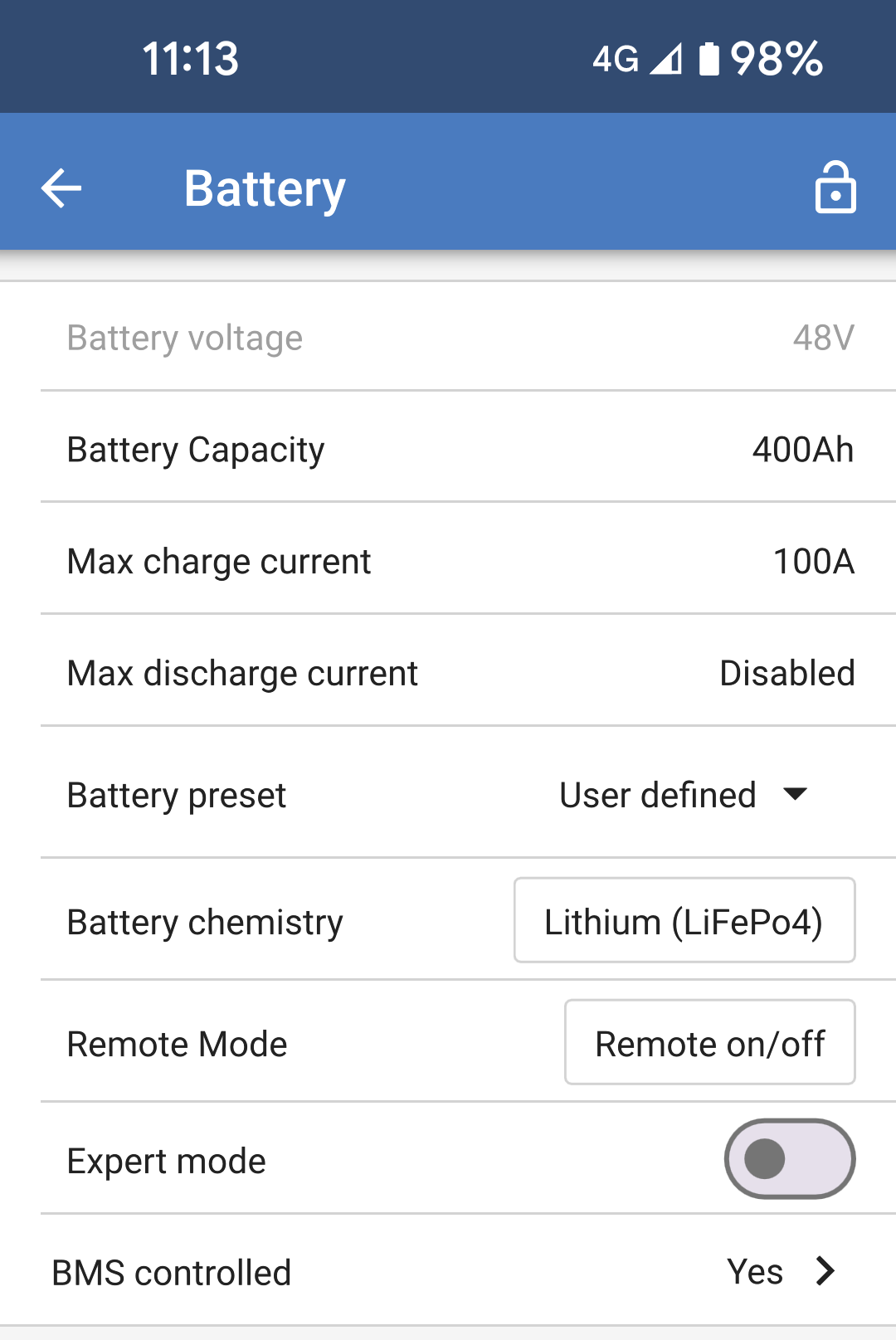
The Battery Settings page allows adjustment of all of the parameters related to the battery, which is connected to the Multi RS. Some options will be greyed out if a fixed battery preset is selected. A "User defined" battery preset will allow all of the settings to be adjusted.

  • Battery voltage: This option is always greyed out for the Multi RS because it is only a 48V product.

  • Battery capacity: Input the capacity of the battery in Ah. This is important for the internal battery monitor to calculate the battery state of charge correctly. It also defines the dynamic cut off discharge current levels.

  • Max charge current: Adjust the maximum current that the Multi RS will deliver to its battery terminals. By default, this is set to the maximum value. You may wish to reduce this if, for example, you have a smaller battery connected that cannot accept the maximum charge current.

  • Max discharge current: Set the maximum current that the Multi RS can draw at its battery terminals. Any additional power above this limit will be supplied from the AC input or PV which is connected directly to the unit. This setting is disabled by default.

    Note

    This limit only applies if there is an active AC input present.

    This setting is ignored in inverter mode, loads on AC output 1 can cause the limit to be exceeded!

  • Battery preset: Use this to select the battery charge algorithm.

    • Built-in preset: Select one of the built-in presets (Normal, High and LiFePO4 2-wire BMS).

    • User defined: All parameters can be customized manually.

    • Select preset: Select a type from the VictronConnect app battery presets.

    • Create preset: Create a new custom battery preset in the VictronConnect app.

    • Edit presets: Edit an existing battery preset in the VictronConnect app.

  • Battery chemisttry: Choose one of these battery chemistries:

    • OPzS/OPzV

    • Gel/AGM

    • Lithium (LiFePO4)

  • Remote mode: Configure what is connected to the REMOTE_L and REMOTE_H inputs on the user connector.

    • Remote on/off: A simple on/off switch to turn the Multi RS on or off.

    • 2-wire BMS: Use a wired BMS with allow-to-charge and allow-to-discharge signals like the SmallBMS. Note if 2-wire BMS is selected, then the unit will not start up until one is connected.

  • Expert mode: This on/off toggle enables editing expert settings in case your equipment has special requirements

MultiRS_Battery_1.png
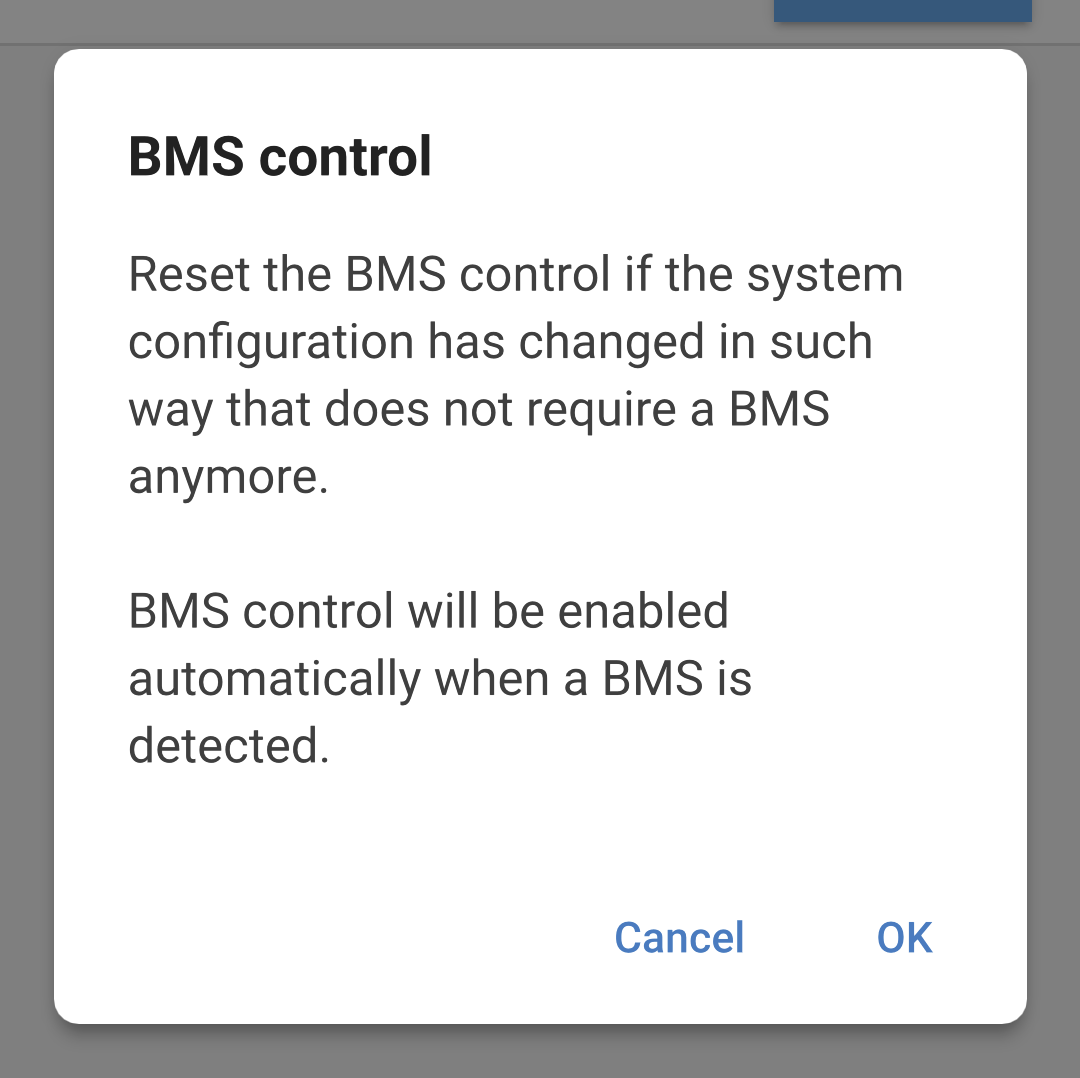
  • BMS controlled: This item is only visible in case the unit is controlled remotely by a BMS. This is automatically enabled when the Multi RS detects that it is connected to a system with a BMS. Click this field to change.

    A confirmation box will pop up. Select "OK" to reset BMS control. The Multi RS will no longer be controlled by a BMS. BMS control will be automatically enabled the next time it is connected to a system that has a BMS.

MultiRS_BMS_Control_Reset.png

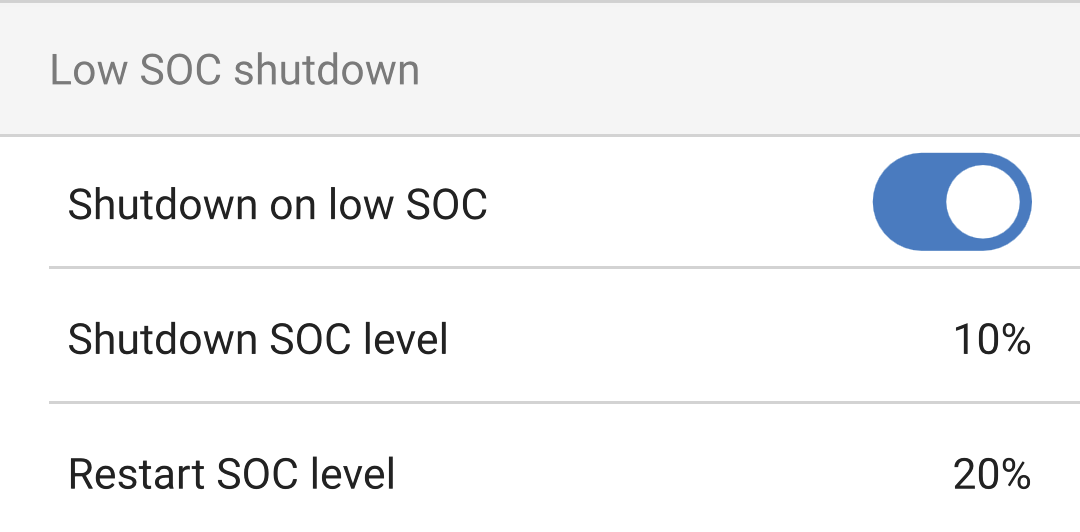
Low SOC shutdown:

  • Shutdown on low SOC: Toggle this setting on if you wish the Multi RS to stop discharging the battery based on the battery state of charge as determined by the battery monitor.

  • Shutdown SOC level: Set the battery level that the Multi RS will stop discharging the battery and the inverter will shut down.

  • Restart SOC level: When the battery is recharging again, and the SOC level rises above this value, then the Multi RS will restart.

MultiRS_Battery_Low_SOC_shutdown.png

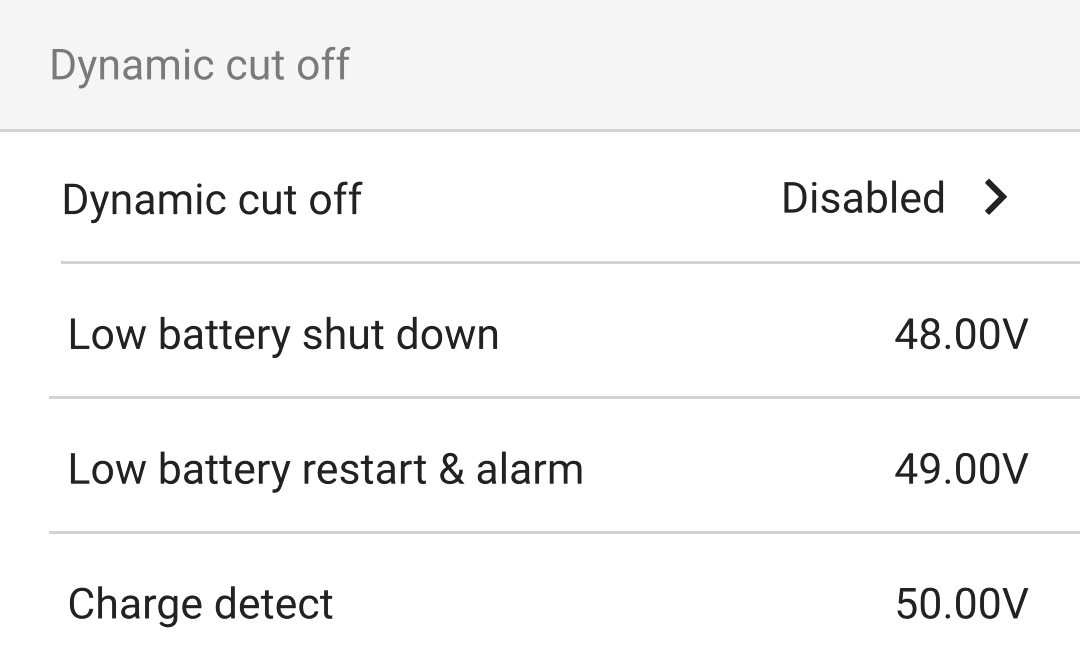
Dynamic cut off:

  • Dynamic cut-off: If this is disabled, then the low battery shutdown voltages will be at fixed levels defined below.

  • Low battery shutdown: Specify a fixed voltage at which the Multi RS will shutdown.

  • Low battery restart & alarm: After a 30 second delay the Multi RS will restart. After three restarts then the Multi RS will stop trying to restart and remain shutdown until it is reset or the Charge detect voltage level is exceeded.

    This is also the voltage level at which a low battery alarm will be triggered.

  • Charge detect: If the Multi RS has shut down due to low battery then the voltage must rise above this level before it will restart.

MultiRS_Battery_Dynamic_cutoff.png

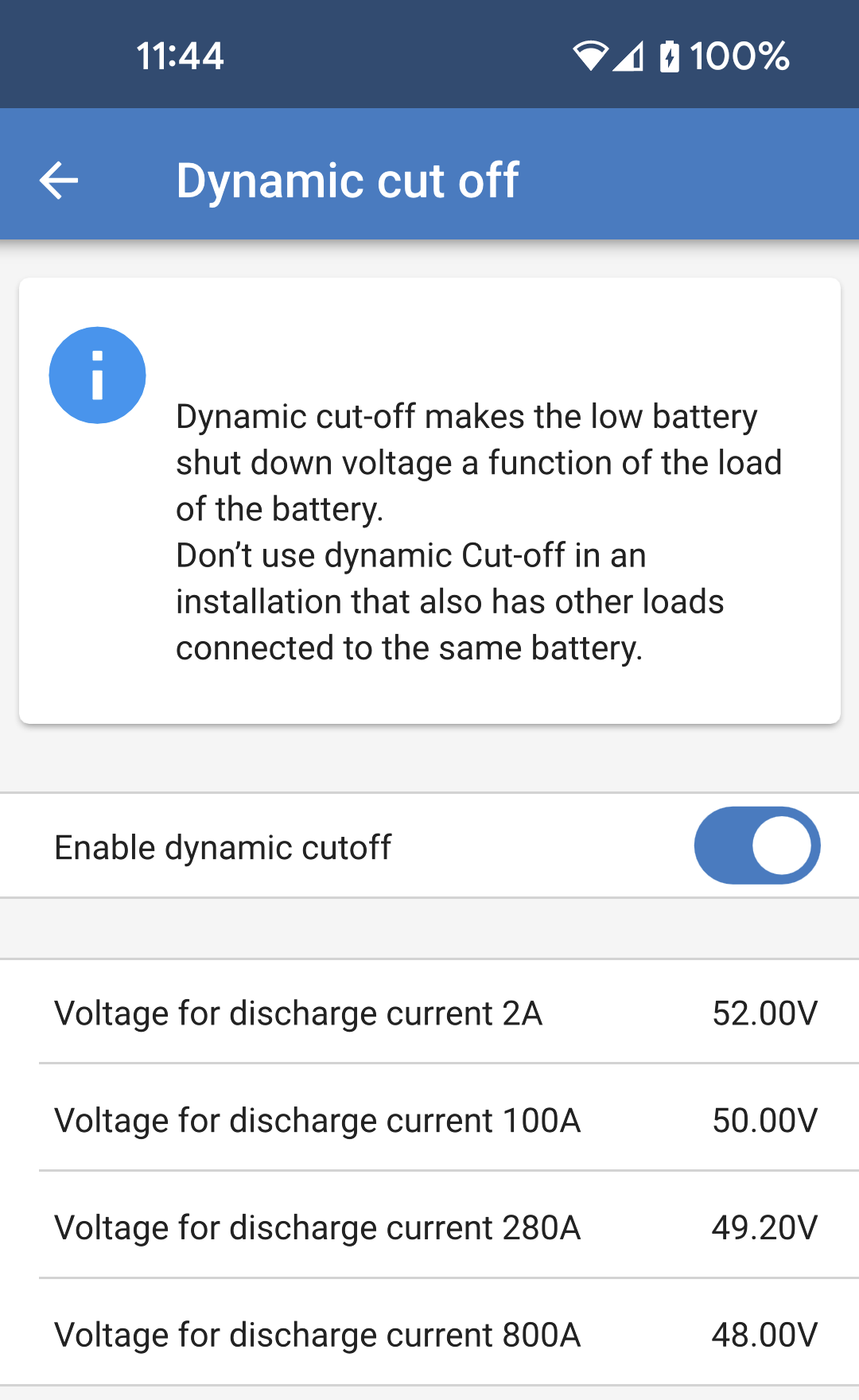
The Dynamic cut-off settings page will be displayed if it is enabled in the Dynamic cut off section as above. The discharge current levels are dependent upon the battery capacity. It is important that the battery capacity setting is correct for the discharge current levels to be relevant for the installation.

  • Enable dynamic cut-off: If this is enabled, then the low battery shut down voltages will be dynamic and will depend upon the present battery discharge current.

    There are four different fields where you can set the cut-off voltage at increasing discharge current levels.

MultiRS_Battery_Dynamic_cut_off_settings.png

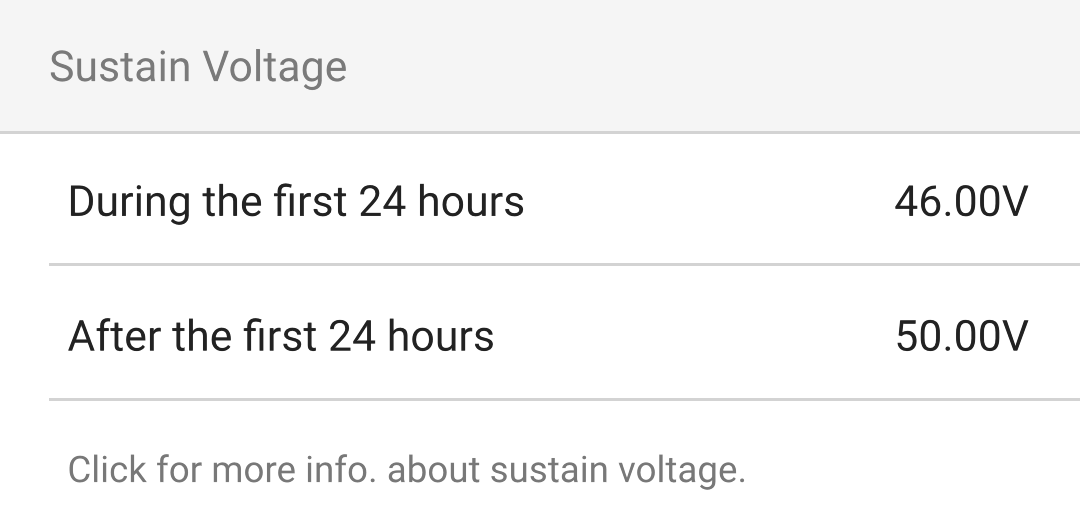
Sustain voltage:

If the battery voltage gets very low due to a lack of charging, there is a good chance that they will be damaged. Even small loads can reduce the battery voltage so low that the battery would not be recoverable.

The sustain mechanism will help to prevent battery damage by preventing the battery voltage from getting any lower by applying a trickle charge to the battery.

  • During the first 24 hours: Specify the voltage that the battery will be kept at for the first 24 hours, unless charging is resumed.

  • After the first 24 hours: If, after 24 hours, the battery voltage has not increased above the setting defined for the first 24 hours, then the battery voltage will be increased to the level set here.

Click for more info. about sustain voltage: Tap this field to bring up a popup that will provide more information about how the sustain voltage works.

MultiRS_Battery_Sustain.png

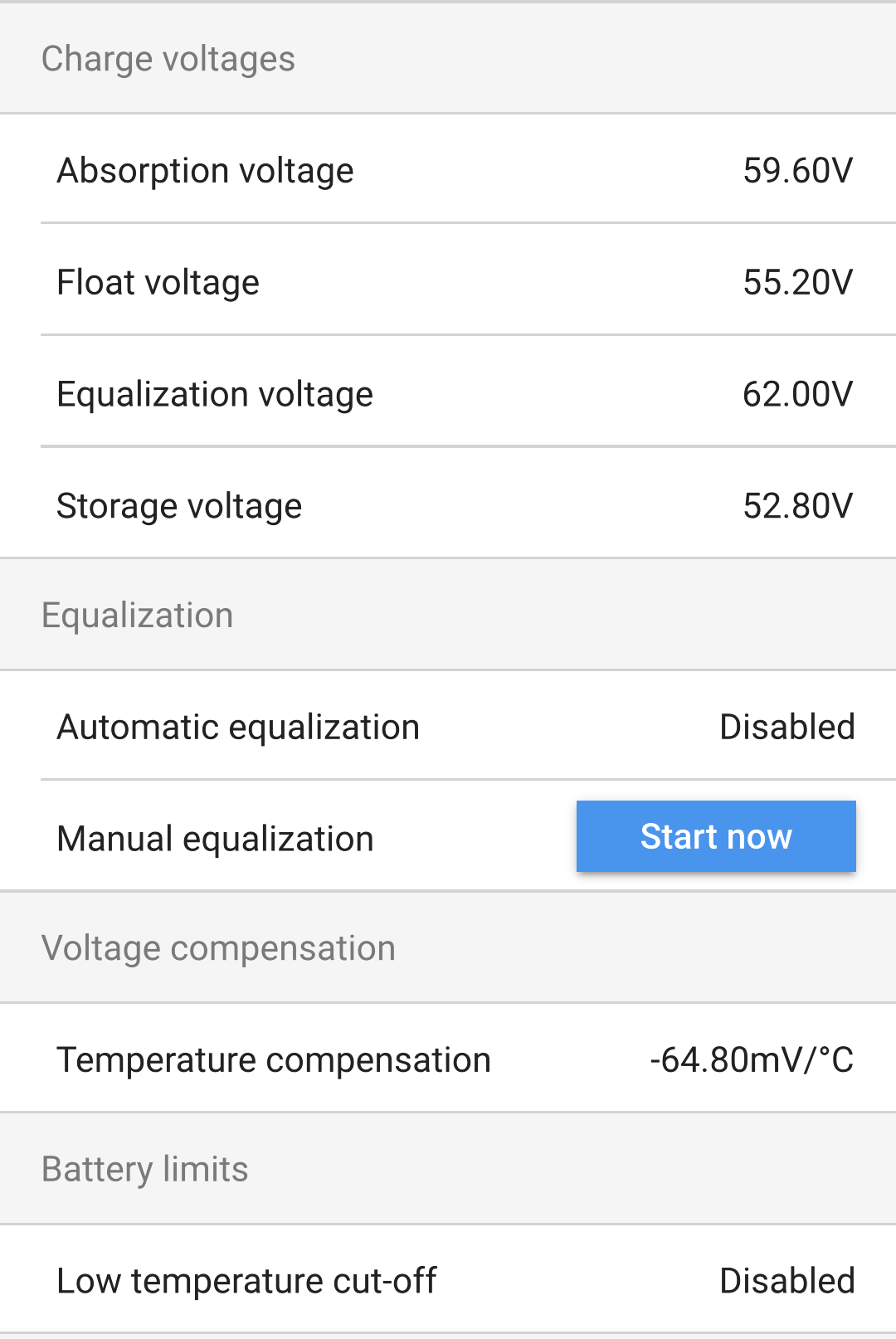
Charge voltages:

  • Absorbtion voltage: Set the absorbtion voltage.

  • Float voltage: Set the float voltage.

  • Equalization voltage: Set the equalization voltage.

  • Storage voltage: Set the storage voltage. It is possible that the Multi RS will have a continuous AC supply, and some battery types can be damaged by an extended float voltage being applied to them. The storage voltage can be set lower than the float voltage for extended storage times when the battery is not being cycled.

Equalization:

  • Automatic equalization: Set up the frequency of the auto equalize function. Available options are between 1 and 250 days.

    Equalization is typically used to balance the cells in a lead battery and also to prevent stratification of the electrolyte in flooded batteries. Whether (automatic) equalization is necessary or not depends on the type of batteries and their usage. Consult your battery supplier for guidelines.

    When the automatic equalization cycle has initiated, the charger applies an equalization voltage to the battery as long as the current level stays below the equalization current percentage setting of the bulk current.

    In the case of all VRLA batteries and some flooded batteries, automatic equalization ends when the voltage limit (maxV) has been reached, or after a period equal to (absorption time/8), whichever comes first.

    For all tubular plate batteries and also for the user-defined battery type, automatic equalization will end after a period equal to (absorption time/2).

    For the lithium battery type, equalization is not available.

    When an automatic equalization cycle is not completed in one day, it will not resume the next day. The next equalization session will take place according to the interval set in the 'Auto Equalization' option.
  • Manual equalization: Tap "Start now" to begin equalization immediately. The duration is limited to 1 hour. This should only be initiated during absorbtion or float stages and when there is sufficient sunlight.

Voltage compensation:

  • Temperature compensation: Many battery types require a lower charge voltage in warm operating conditions and a higher charge voltage in cold operating conditions.

    The configured coefficient is in mV per degree Celsius for the whole battery bank, not per cell. The base temperature for the compensation is 25°C (77°F), as shown in the chart below.

    With a temperature sensor installed on the User I/O connection block, the actual battery temperature will be used for compensation throughout the day.

Battery limits:

  • Low temperature cut-off This setting can be used to disable charging at low temperatures as required by lithium batteries.

    For Lithium Iron Phosphate batteries this setting is preset at 5 degrees Celsius. For the other battery types it is disabled. When creating a user-defined battery, the cut-off temperature level can be adjusted manually.

MultiRS_Battery_Basic_Settings.png

When "Expert mode" is enabled, the following additional settings will become available:

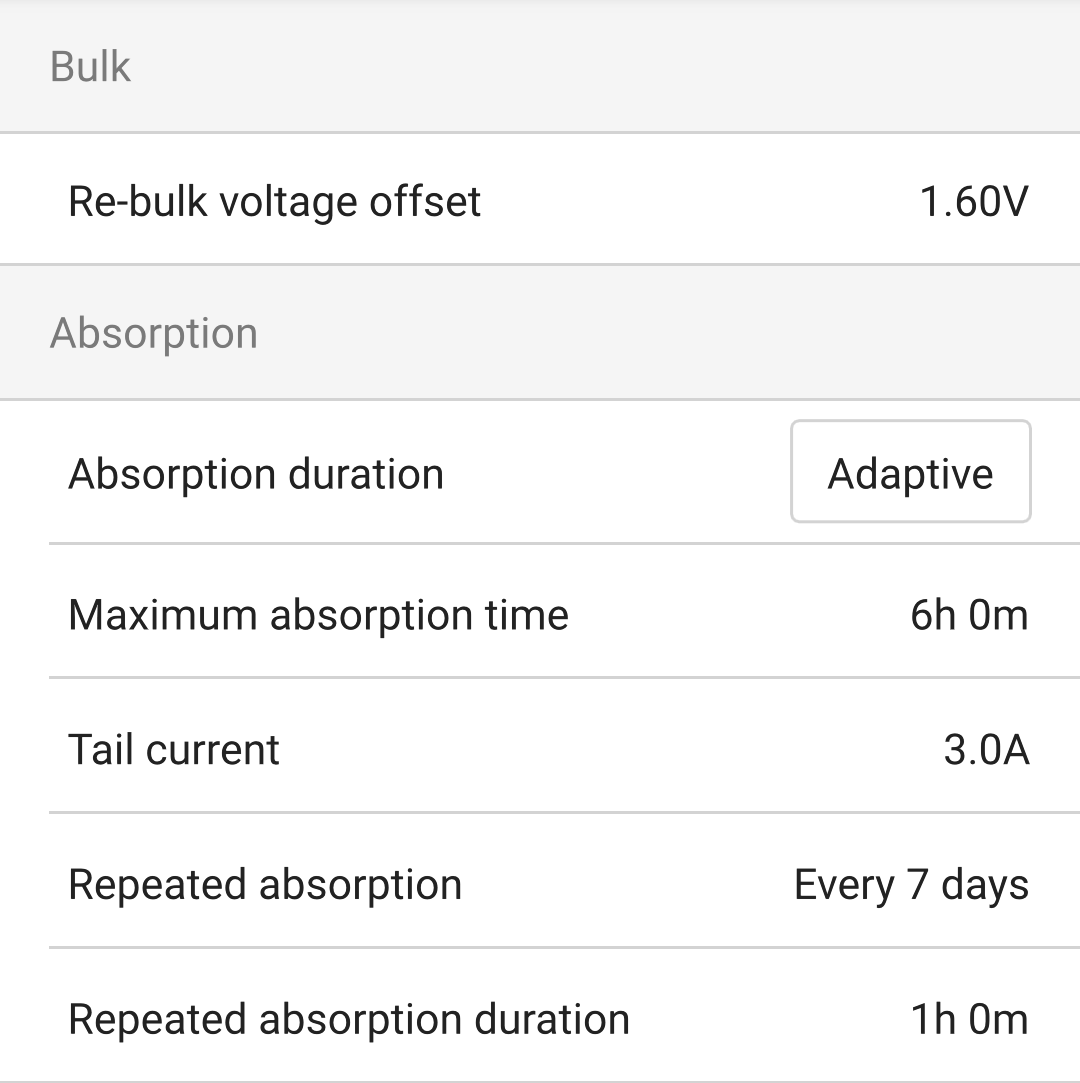
Bulk:

  • Re-bulk voltage offset: Set the voltage offset that will be used over the float voltage setting that will determine the threshold that the charge cycle will restart.

    For example, with a Re-bulk voltage offset off 0.4V and a float voltage setting of 54.0 V, the voltage threshold that will be used to restart the charge cycle will be 53.6 V. In other words, if the battery voltage drops below 53.6 V for one minute, the charge cycle will restart.

Absorbtion:

  • Absorbtion duration: Select "Fixed" or "Adaptive". When you tap on the box to the right a detailed explanation for each option will pop up.

  • Maximum absorbtion time: Set the absorption time limit. This is only available when using a custom charge profile.

  • Tail current: Set the current threshold that will be used to finish the absorption phase before the maximum absorption time expires. When the battery current gets below the tail current for one minute, the absorption phase will end. This setting can be disabled by setting it to zero.

  • Repeated absorbtion: Choose how often the automatic absorbtion stage should be repeated.

    Setting the interval time to 0 will disable repeated absorbtion.

  • Repeated absorbtion duration: Adjust the length of time that a repeated absorbtion stage will be.

MultiRS_Battery_Expert_Bulk.png

Equalization:

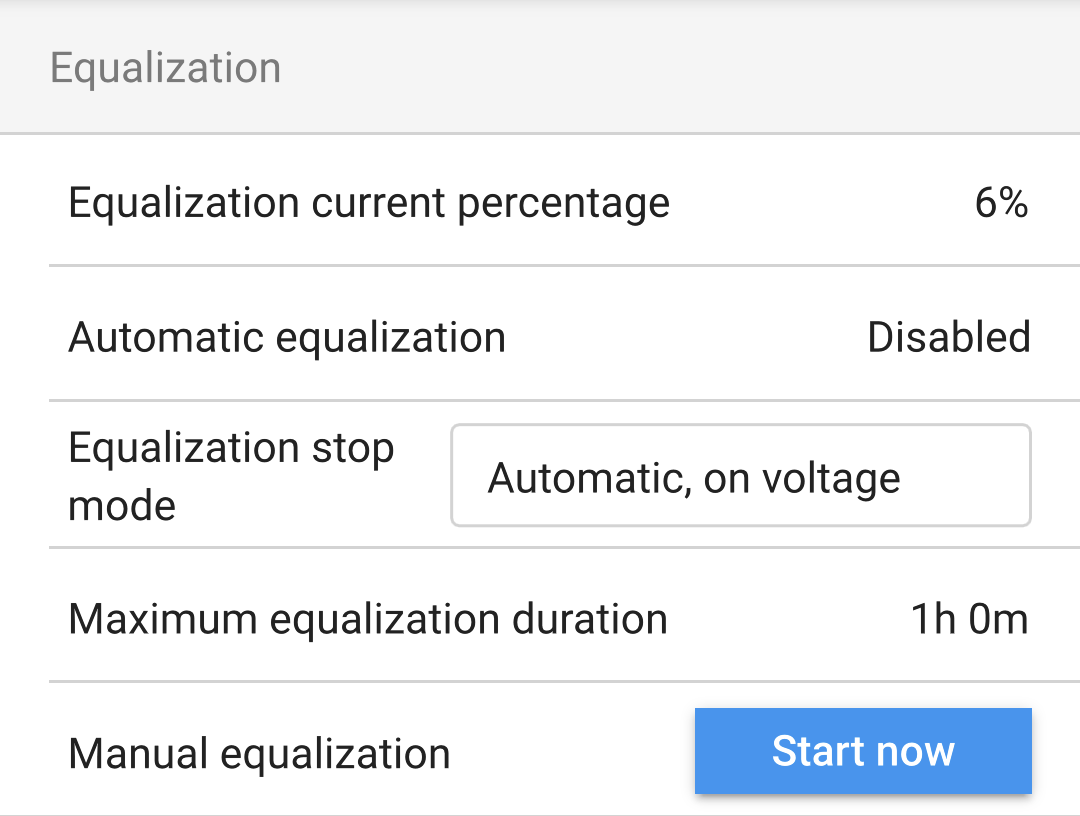
  • Equalization current percentage: Set the percentage of the Max charge current setting that will be used when equalization is performed.

  • Automatic equalization: If enabled, then the Multi RS will perform an equalization stage automatically at a chosen time interval.

  • Equalization stop mode: Equalization can be set to either stop automatically when a chosen voltage level is reached or when a fixed amount of time has elapsed.

  • Maximum equalization duration: The maximum duration that an equalization stage will last in any case.

  • Manual equalization: Perform a manual equalization stage immediately. A manually triggered equalization stage will last for a maximum of one hour.

MultiRS_Battery_Expert_Equalization.png

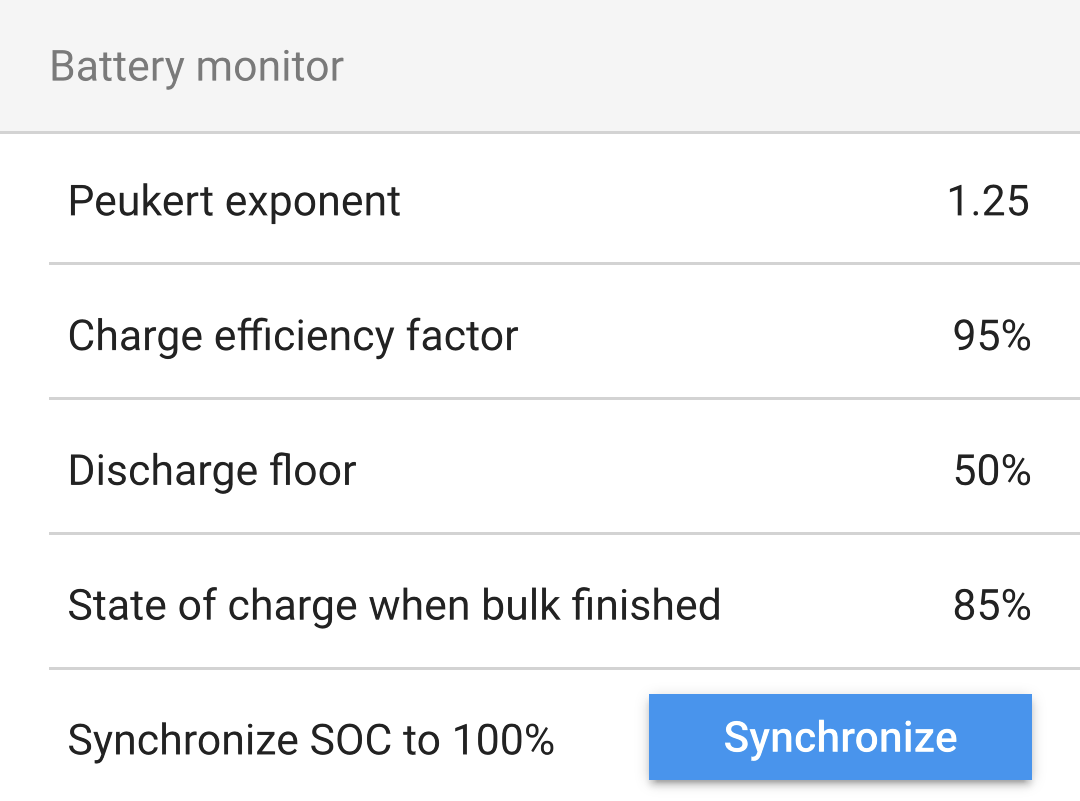
Battery monitor:

  • Peukert exponent: Adjust the Peukert exponent value to suit the battery type being used. Consult the battery specification sheet for the correct value. If the Peukert value cannot be found, then typical use values are 1.25 for lead acid batteries and 1.05 for lithium batteries. A value of 1.00 will disable the Peukert exponent calculation.

  • Charge efficiency factor: Due to charging losses, a battery will need more Ah to fully charge it again than the amount that was discharged from it. The default setting is 95%. Increase this value for batteries with a higher charge efficiency. For example, lithium batteries could be as high as 99%.

  • Discharge floor: This is the lowest level that the battery should be discharged down to. For example, lead acid batteries should not be discharged below 50%.

  • State of charge when bulk finished: Define the SOC of the battery as soon as the bulk stage is complete and the absorbtion voltage is reached.

  • Synchronize SOC to 100%: Force the battery monitor to state 100%. Only use this when you are sure that the battery SOC is actually 100% and you want the battery monitor to reflect this.

MultiRS_Battery_Expert_Battery_Monitor.png