User I/O
The user I/O terminal block is located on the left hand side inside the wiring compartment.
The terminal block can be removed to make connecting small wires easier. To release it, push both orange levers (top and bottom of the connector) to the left.
Connections are made by pushing the wire into the hole. In the "TOP" orientation, the wire can be released by pushing down the orange tab next to the hole with a small flat blade screwdriver.
Note
From the factory, there is a wire link installed in the Remote_H and Remote_L position. This will enable the Multi RS to operate by default. If this wire link, or the connector is removed then the Remote_H and Remote_L terminals become open circuit, and the Multi RS will not turn on.
The diagram below shows the pinout of the connector and the function of each pin. The functions are also printed on the side of the connector itself.
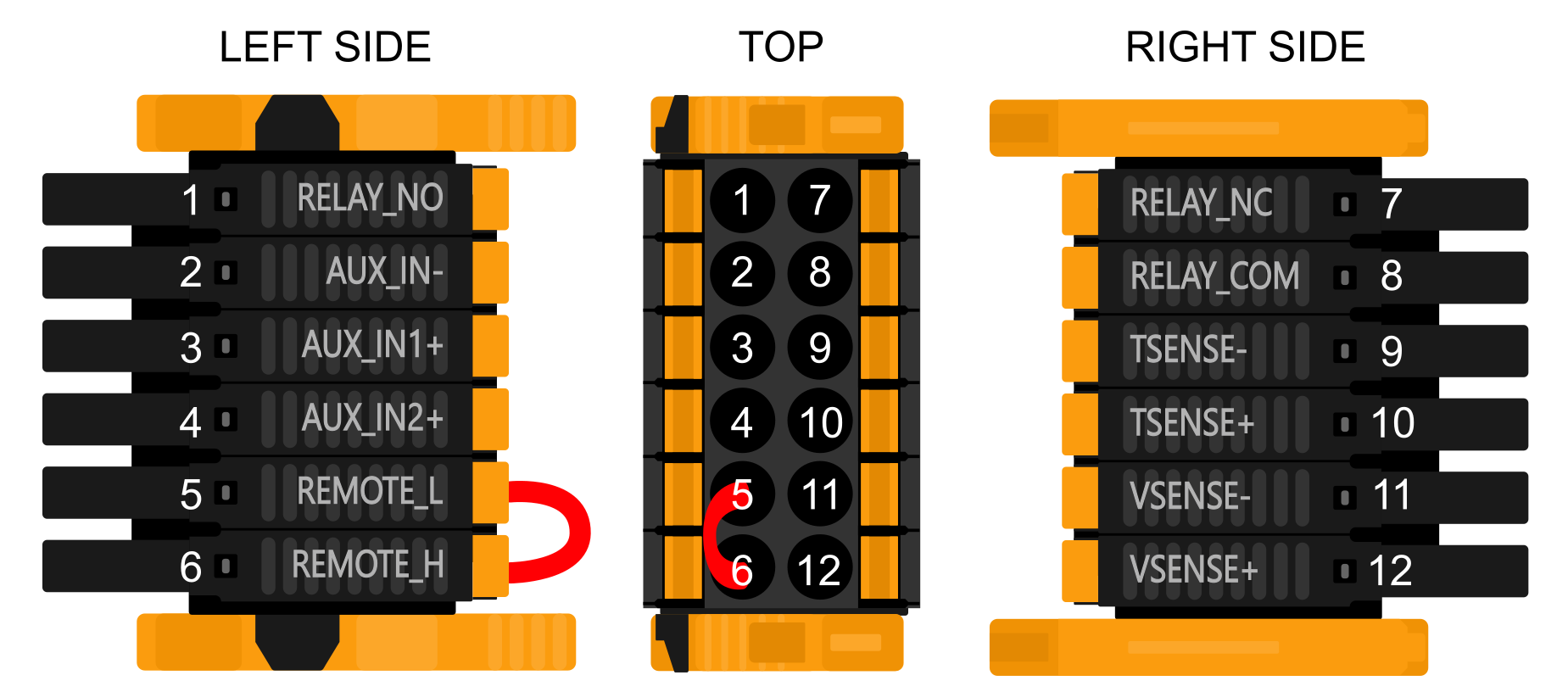
Pin number | Pin name | Description |
|---|---|---|
1 | RELAY_NO | Programmable relay Normally Open connection |
2 | AUX_IN- | Common negative for programmable auxiliary inputs |
3 | AUX_IN1+ | Programmable auxiliary input 1 positive connection |
4 | AUX_IN2+ | Programmable auxiliary input 2 positive connection |
5 | REMOTE_L | Remote on/off connector Low |
6 | REMOTE_H | Remote on/off connector High |
7 | RELAY_NC | Programmable relay Normally Closed connection |
8 | RELAY_COM | Programmable relay Common connection |
9 | TSENSE- | Temperature Sensor negative |
10 | TSENSE+ | Temperature Sensor positive |
11 | VSENSE- | Voltage Sensor negative |
12 | VSENSE+ | Voltage Sensor positive |