Device display
The Multi RS19 Solar has an LCD screen that displays operational information.
The pages will change one after the other, pausing for about six seconds on each one.
Inverter state: This shows when the Multi RS19 Solar is inverting with the Ac input relay open. Power output, Frequency, and AC voltage. | 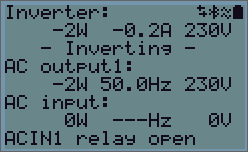 |
This shows the state of the AC input with its relay closed. Power input, Frequency, and AC voltage are shown. A negative value means that power is being exported through the AC input. The bottom line shows the status of the AC input relay. | 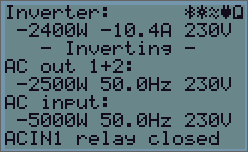 |
Battery:
Battery Power (charging shows positive number, discharging shows negative number), Current, DC voltage, Temperature (*), State-of-charge (*) and Time-to-go (*). Battery state (e.g. discharging, bulk, absorption, float, etc).
Battery state: The second line of the display shows the status of the battery. If an unmanaged battery, such as a lead-acid type is connected, then the values are measured at the battery terminals of the Multi RS19 Solar itself. These values don't account for other charge sources or loads in the wider system. If a managed battery or a system battery monitor is connected, then the values will be read from it. Battery power, battery voltage and current. Negative power and current values indicate battery discharge. The third line of the display shows the battery temperature, state of charge, and estimated time remaining. These values may come from the system battery monitor if available. | 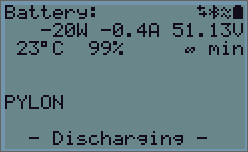 |
Solar:
The solar power, voltage and current are shown for each of the MPPT trackers, Solar 1 and Solar 2. If you have an AC PV inverter connected to the AC output, then its power and yield will be displayed. The daily yield and the total yield are also displayed. | 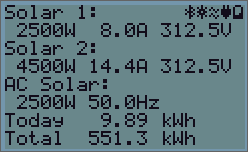 |
In the top right of the display are other system information icons.
 | Communicating on any interface (e.g., Bluetooth, VE.Can, etc.) |
 | Bluetooth Enabled, Icon colour changes when connected |
 | MPPT Active |
 | (Blinking) Error or Warning |
 | Inverter Active |
 | Battery, fill corresponds with voltage, blinks when empty |