5. Operation
5.1. Device display
The Multi RS19 Solar has an LCD screen that displays operational information.
The pages will change one after the other, pausing for about six seconds on each one.
Inverter state: This shows when the Multi RS19 Solar is inverting with the Ac input relay open. Power output, Frequency, and AC voltage. | 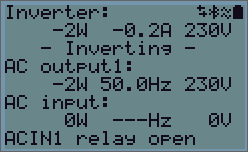 |
This shows the state of the AC input with its relay closed. Power input, Frequency, and AC voltage are shown. A negative value means that power is being exported through the AC input. The bottom line shows the status of the AC input relay. | 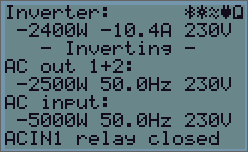 |
Battery:
Battery Power (charging shows positive number, discharging shows negative number), Current, DC voltage, Temperature (*), State-of-charge (*) and Time-to-go (*). Battery state (e.g. discharging, bulk, absorption, float, etc).
Battery state: The second line of the display shows the status of the battery. If an unmanaged battery, such as a lead-acid type is connected, then the values are measured at the battery terminals of the Multi RS19 Solar itself. These values don't account for other charge sources or loads in the wider system. If a managed battery or a system battery monitor is connected, then the values will be read from it. Battery power, battery voltage and current. Negative power and current values indicate battery discharge. The third line of the display shows the battery temperature, state of charge, and estimated time remaining. These values may come from the system battery monitor if available. | 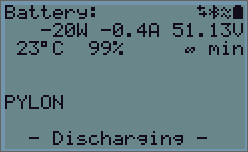 |
Solar:
The solar power, voltage and current are shown for each of the MPPT trackers, Solar 1 and Solar 2. If you have an AC PV inverter connected to the AC output, then its power and yield will be displayed. The daily yield and the total yield are also displayed. | 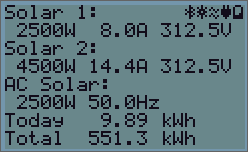 |
In the top right of the display are other system information icons.
 | Communicating on any interface (e.g., Bluetooth, VE.Can, etc.) |
 | Bluetooth Enabled, Icon colour changes when connected |
 | MPPT Active |
 | (Blinking) Error or Warning |
 | Inverter Active |
 | Battery, fill corresponds with voltage, blinks when empty |
5.2. Protections and automatic restarts
5.2.1. Overload
Some loads like motors or pumps draw large inrush currents during start-up. In such circumstances, it is possible that the start-up current exceeds the over current limit of the Multi RS19 Solar. In this case the output voltage will quickly decrease to limit the output current of the inverter. If the over current limit is continuously exceeded, the inverter will shut down for 30 seconds and then automatically restart. After three restarts followed by overload within 30 seconds of restarting, the inverter will shut down and remain switched off. To restart normal operation, disconnect the load, Switch Off the Multi RS19 Solar, then switch it On.
5.2.2. Low battery voltage thresholds (adjustable in VictronConnect)
The Multi RS19 Solar will shut down when the DC input voltage drops below the low battery shutdown level. After a minimum shutdown time of 30 seconds, the Multi RS19 Solar will restart if the voltage has risen above the low battery restart level.
After three shut down and restarts, followed by a low battery shutdown within 30 seconds of restarting, the Multi RS19 Solar will shut down and stop retrying based on the low battery restart level. To override this and restart the Multi RS19 Solar, switch it Off, and then On, and limit loads to enable recharging of the battery with solar energy.
See the Technical Data table for default low battery shut down, restart and charge detect levels. They can be adjusted with VictronConnect (computer or app).
Additionally another external MPPT or battery charger can also be used to recharge the battery to reach the Restart Voltage or Charge Detect voltage level. If using the allow to charge signal functionality, it must remain above the minimum voltage, so if the battery is completely dead it will not allow charging to start. In this case, you can temporarily disable this function in VictronConnect to allow charging to resume, then enable it again.
See the Technical Data table for default low battery shut down and restart levels. They can be changed with VictronConnect (computer or app). Alternatively Dynamic Cut-off can be implemented, see https://www.victronenergy.com/live/ve.direct:phoenix-inverters-dynamic-cutoff
5.2.3. High battery voltage
Reduce DC input voltage and/or check for a faulty battery- or solar-charger in the system. After shutting down due to a high battery voltage, the Multi RS19 Solar will first wait 30 seconds and then retry operation as soon as the battery voltage has dropped to acceptable level.
5.2.4. High temperature
A high ambient temperature or enduring high load may result in shut down to over temperature. The Multi RS19 Solar will restart after 30 seconds. The Multi RS19 Solar will continue to try and resume operation, and will not stay off after multiple retries. Reduce load and/or move Multi RS19 Solar to a better ventilated area.