2. Introduction
2.1. Compatibility notice
Some chapters or sections in this manual may include references to features such as VE.Bus, analogue inputs (tank and temperature), digital I/O, or generator start/stop control.
These functions are not available on the Nucleo GX in its standard configuration. They can only be added by using optional USB accessories such as the MK3-USB interface, GX I/O Extender 150, or GX Tank 140, where applicable.
2.2. What is the Nucleo GX?
The Nucleo GX is a compact, high -performance communication centre for monitoring and controlling your Victron system. It offers fast system response, reliable connectivity, and flexible expansion via USB accessories. Ideal for VE.Can-based installations such as RS systems, it provides full GX functionality with simple setup and seamless remote access through VRM, LAN, or WiFi.
Additional functionality such as VE.Bus connectivity, relays, or analogue inputs can easily be added via optional USB accessories : the MK3-USB interface , GX I/O Extender 150 , or GX Tank 140. Although the Nucleo GX has no HDMI port, an Android GX WiFi Display can be used for local display and control. System access is also available through VictronConnect , a web browser, or VRM.
GX devices can be placed at the core of any Victron energy installation. They run the Venus OS operating system and ensure seamless communication between all connected components, including inverter/chargers, solar chargers, DC-DC chargers and batteries.
You can monitor and control your system:
Remotely, via the Victron Remote Management (VRM) portal using an internet connection (see Accessing via VRM)
Locally, via:
A web browser (see Accessing the Remote Console via local LAN/WiFi Network)
An Android tablet or phone as a dedicated display (see Android GX WiFi Display)
A Multi-Functional Display (MFD) (see Marine MFD integration by App)
The VictronConnect app over LAN, WiFi, or Bluetooth (where applicable)
The built-in WiFi Access Point
The Remote Console provides a central user interface for system monitoring and configuration, accessible both locally and remotely.
The NGX also supports VRM: Remote firmware updates and allows remote configuration changes.
Note: This manual refers to the latest firmware version. You can check the current version via the Device menu under Settings → General → Firmware (see the Firmware updates chapter). If your GX device is not connected to the internet, the latest firmware can be downloaded from Victron Professional.
2.3. Manuals for discontinued GX devices
Note
Manuals for GX devices that are no longer in production are available in the old manuals section of the Victron Energy website:
These manuals are no longer updated. This does not mean that the features described in the present manual are unavailable on discontinued GX devices. Most functionality is provided by the Venus OS firmware rather than by the hardware, and is therefore also available on older GX devices, provided the installed firmware version supports the feature and the hardware requirements stated for it are met.
2.4. What's in the box?
Nucleo GX | 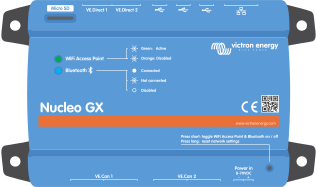 |
Power cable with inline fuse and M8 terminal eyes for battery or DC busbar-attachment. |  |
VE.Can terminators (2 pcs) |  |