5. Installation
5.1. Mounting
The Smart IP43 Charger range is designed to be permanently mounted using the mounting flanges integrated into the heat sink.
Before mounting, the following aspects should be considered to identify/provide a suitable and safe location:
Install the charger in a location with good natural airflow/ventilation; in case airflow is a restricted, consider adding a cooling fan.
Ensure there is sufficient unobstructed space around the charger; a minimum clearance of 100mm above and below is recommended.
Install the charger on a non-flammable substrate and ensure there are no heat-sensitive items in the immediate vicinity; it is normal for the charger to become hot during operation.
Install the charger in a location where it is protected from environmental conditions such as water, high moisture and dust, and also located well away from any flammable liquids or gasses.
Do not install or place/operate the charger on top of the battery, directly above the battery, or in a sealed compartment with the battery; batteries can emit explosive gasses.
Do not cover or place any other items on top of the charger.
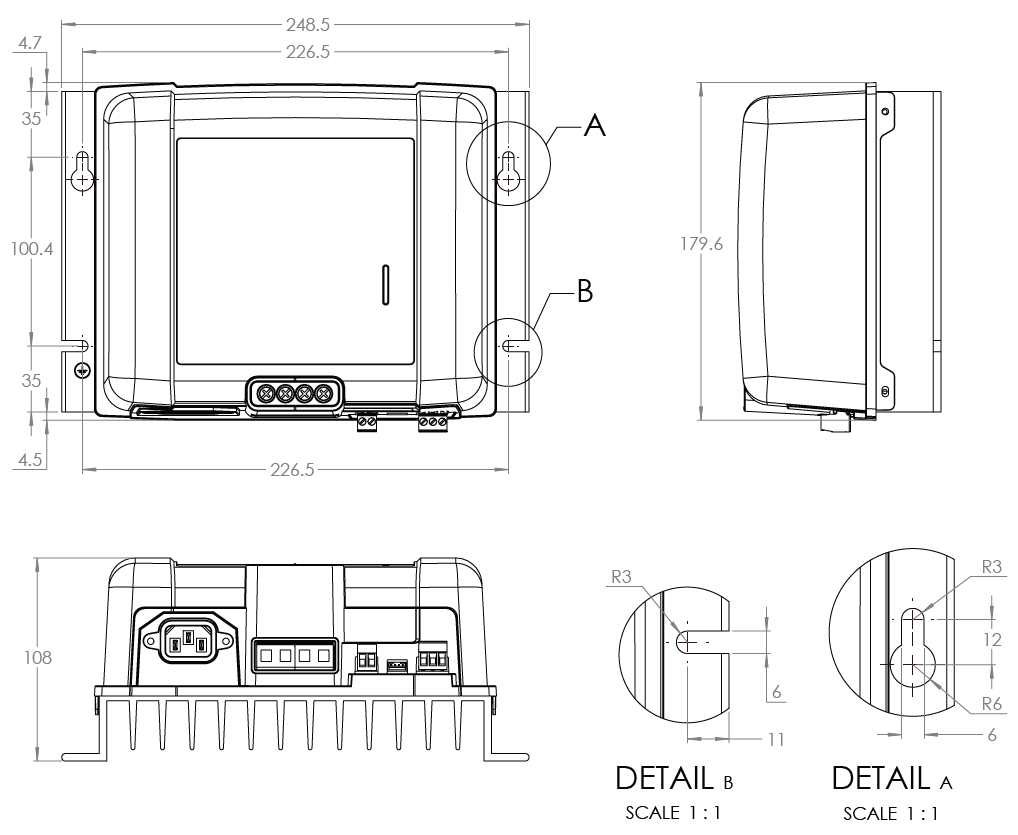
Mount the Smart IP43 Charger vertically with the terminals facing down; secure using suitable screws though the mounting holes/slots.
Select and use screws with a pan/flange head (do not use screws with a countersunk/tapered head), and a screw thread outer diameter well matched to the mounting hole/slot internal diameter (~5mm max OD to provide a clearance fit).
To aid installation, it is recommended to hang the unit using the 2 upper screws (leave the screw heads ~3mm from the surface) and then install the 2 lower screws, before fully securing all 4 screws.
Refer to the drawing below for mounting dimensions:
5.2. Wiring
Connect suitable DC power cabling to the Smart IP43 Chargers BATTERY terminals.
Prepare flexible multi stranded copper DC power cable with sufficient cross sectional area; refer to the 'Installation > Wiring > DC power cable' section for more information.
Connect the positive DC cable (red insulation) to the positive (+) terminal and the negative DC cable (black insulation) to the negative (-) terminal connection; ensure that the cable connection polarity is correct.
Torque the terminal screws to 2.4Nm using a suitable torque wrench and screw driver bit.
Install a suitably rated inline fuse or circuit breaker within the DC power cabling between the Smart IP43 Charger and battery/batteries, located as close as practical to the battery/batteries; refer to the 'Installation > Wiring > Overcurrent protection' section for more information.
Connect the DC power cabling to the battery/batteries or DC system distribution bus - follow the instructions relevant to the installation type.
For hardwired installations, or when charging a battery outside of a vehicle/installation:
Ensure that the DC system is shut down (all DC loads and charge sources off/isolated) prior to disconnection of any existing battery / DC system distribution bus cabling and connection of the charger to the battery terminals / DC system distribution bus.
Connect the positive DC cable (red insulation) to the positive (+) terminal and the negative DC cable (black insulation) to the negative (-) terminal connection; ensure that the cable connection polarity is correct.
Torque all wiring termination hardware to manufacturers torque specifications using a suitable torque wrench and socket / screw driver bit.
For temporary installations when charging a battery installed within a vehicle, and the negative (-) battery terminal is grounded to the vehicle chassis (conventional):
Connect the positive DC cable / battery clamp (red insulation) directly to the battery positive (+) terminal first.
Then connect the negative DC cable / battery clamp (black insulation) to a suitable grounding point on the vehicle chassis (not directly to the negative battery terminal).
When disconnecting the charger, disconnect the DC cables / battery clamps in reverse of the connection order.
For temporary installations when charging a battery installed within a vehicle, and the positive (+) battery terminal is grounded to the vehicle chassis (unconventional):
Connect the negative DC cable / battery clamp (black insulation) directly to the battery negative (-) terminal first.
Then connect the positive DC cable / battery clamp (red insulation) to a suitable grounding point on the vehicle chassis (not directly to the positive battery terminal).
When disconnecting the charger, disconnect the DC cables / battery clamps in reverse of the connection order.
Connect VE.Direct communication cable (between VE.Direct port on charger and Venus device) and/or control wiring (remote on/off and/or programmable relay) as required for the installation.
Connect the Smart IP43 Charger AC power cable to a mains power outlet; after a short delay all LEDs will illuminate briefly, then the LEDs indicating the current charge mode and charge state will illuminate.
Notice
Example wiring schematics depicting most typical installation configurations are also provided for reference; refer to the 'Installation > Schematics' section for more information.
5.2.1. DC power cable
The Smart IP43 Charger range features rising clamp screw terminals for connection to DC power cabling, which is not included and needs to be supplied by the installer.
To ensure optimal and reliable operation, it is important to select high quality flexible DC power cabling that is suitable for the specific charger model and the overall installation; DC power cable selection should consider the following aspects:
Cable size/gauge
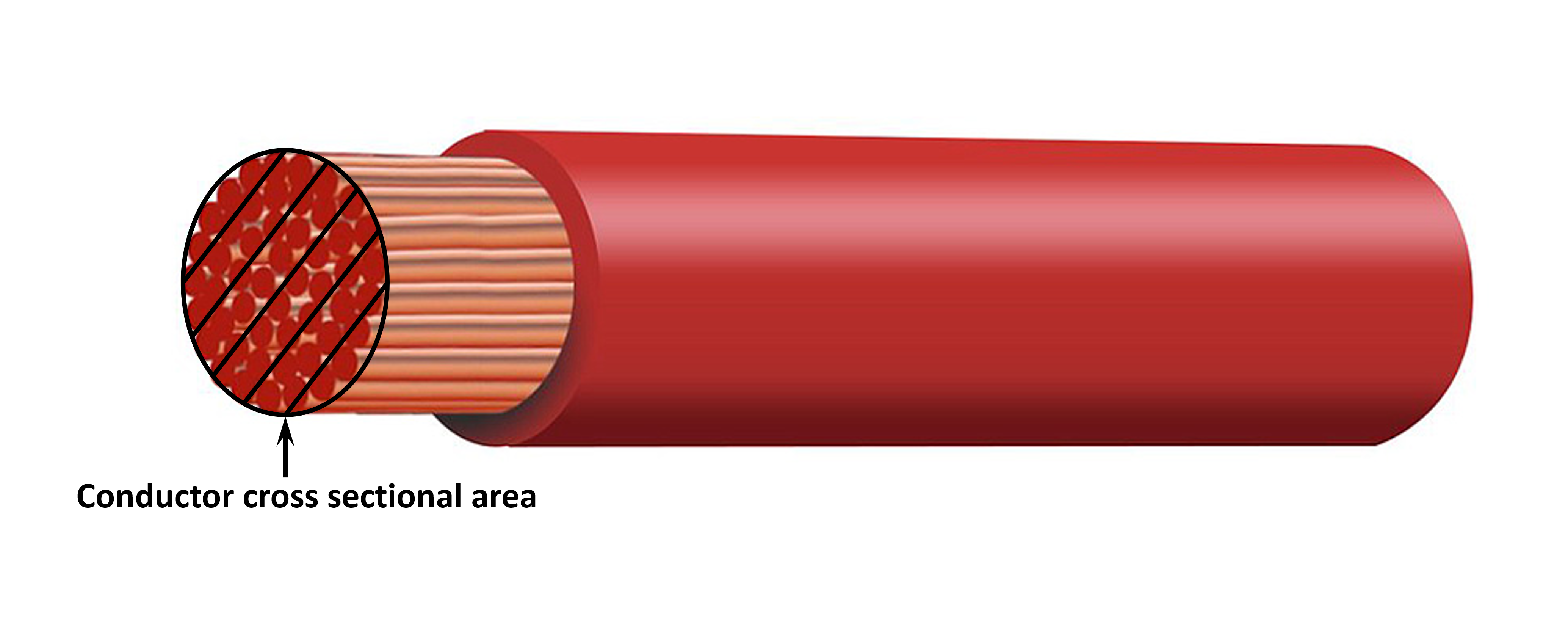
Conductor cross sectional area is proportional to the resistance of a cable per unit length, which effects the amount of heat generated per unit length and the voltage drop over the total cable length.
Current carrying capacity
Current carrying capacity is the maximum current a cable size/gauge can carry in a particular installation environment without exceeding the temperature limit of the cable insulation; accordingly current carrying capacity is dependent on cable size/gauge, the installation environment and the insulation temperature limit.
To prevent overheating of the DC power cable and/or interfacing equipment, the maximum current rating for the selected cable size/gauge (including any de-rating applicable to the installation) must exceed the maximum normal operating current and also the rating of the fuse or circuit breaker installed (in case of an overcurrent fault).
Voltage drop %
Voltage drop percentage is the maximum voltage lost over the cable length, expressed as a percentage in relation to the nominal operating voltage; accordingly voltage drop % is dependent on cable size/gauge, total cable length and the nominal operating voltage.
To prevent excessive power loss and operational issues due to high voltage drop, design the system layout to minimise DC power cable length and select a cable size/gauge that provides a voltage drop of 3% or less (at maximum normal operating current).
Conductor
The conductor material and specifications effect the resistance of a cable per unit length (effecting current carrying capacity), the resistance and heat generated at terminations, and overall cable flexibility.
Conductor material and configuration
Use high quality flexible DC power cabling that consists of fine multi-stranded oxygen free copper conductors.
Strand diameter
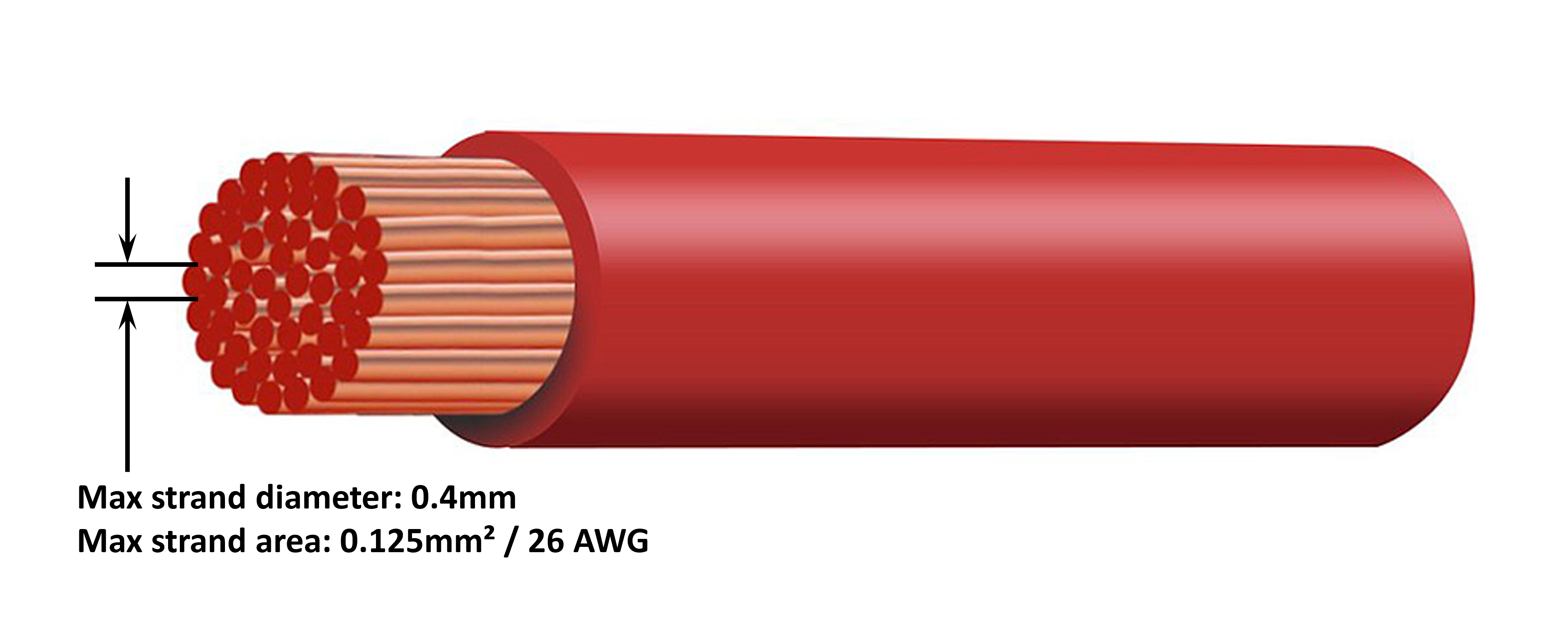
Strand diameter effects the contact area and accordingly the resistance at terminations; a high resistance termination will generate substantial heat when operating under load and can result in severe overheating.
To maximise contact area at terminations and prevent overheating at/near terminations, the diameter of each individual copper strand must not exceed 0.4mm (0.016 inch) or a surface area of 0.125mm² (AWG26).
Flexibility class
To facilitate installation with practical bend radii and prevent failure of the cable and/or interfacing equipment due to excessive force/stress at terminations and/or cyclic fatigue, use high quality flexible DC power cabling with a flexibility class of 5 - Flexible copper conductors, or 6 - Extra flexible copper conductors.
Insulation
The insulation material and specifications effect the maximum temperature capability/rating (effecting current carrying capacity) and the maximum voltage isolation capability/rating of a cable.
Temperature rating
The insulation temperature rating effects the current carrying capacity of a cable and must not be exceeded when considering the combination of a) maximum ambient temperature, b) the installation environment (which effects the dissipation of heat), and c) temperature rise due the heat generated by the cable when operating at the fuse or circuit breaker current rating.
To prevent overheating of the cable insulation, use high quality flexible DC power cabling with an insulation temperature rating of at least 90°/194°F (preferably 105°C/221°F), or as required for the installation.
Voltage rating
To ensure robust electrical isolation and overall safety, use high quality flexible DC power cabling with an insulation voltage rating that exceeds the maximum operating voltage of the system; high quality flexible DC power cabling typically has an insulation voltage rating of 0.6/1kV.
Refer to the table below for the minimum DC power cable size/gauge (cross sectional area) recommended for each Smart IP43 Charger model, and the installation specific DC power cable length:
Notice
The DC power cable length ranges represent one way length between charger and battery, the total circuit length (positive and negative cable length) has been assumed to be double one way length for the voltage drop calculations.
Certain combinations are "Not recommended" as voltage drop would be excessive even with the largest compatible DC power cable size; in addition to high power loss, excessive voltage drop can cause charging issues.
The DC power cable size/gauge recommendations above are based on cabling with an insulation rating of at least 90°C (194°F) routed within an unenclosed area at 30°C (86°F) ambient temperature and not bundled with other cabling, and a 3% maximum voltage drop limit; these recommendations are generic and do not cover the intricacies of all installations and/or cable types, please consult a certified installer for guidance with specific and/or complex installations.
5.2.2. Remote on/off
The Smart IP43 Charger is equipped with remote on/off terminals, these terminals enable charging to be turned on or off remotely dependent on their state.
There are 3 options to turn the Smart IP43 Charger on using the remote terminal(s):
Interconnect / short the L and H terminals (factory default is a shorting link between L and H). The L and H terminal can be interconnected /shorted via a switch, relay or other external device, like a battery management system (BMS).
Pull the H terminal to a high voltage level; when the voltage on the H terminal is above 2.9V (connected to battery positive for example) the charger will turn on. The H terminal can be connected to a high voltage level via a switch, relay or other external device, like a battery management system (BMS).
Pull the L terminal to a low voltage level; when the voltage on the L terminal is below 3.5V (connected to battery negative for example) the charger will turn off. The L terminal can be connected to a low voltage level via a switch, relay or other external device, like a battery management system (BMS).
To turn the Smart IP43 Charger off using the remote terminal(s), both terminals need to have an open circuit relative to each other and be left floating (no connection to a high or low voltage level).
5.2.3. Programmable relay
The Smart IP43 Charger is equipped with a programmable relay, the relay can be used for external control based on the selected relay mode (Alarm, Remote control, or Charging) and operational conditions.
There are 3 programmable relay terminals:
NO (Normally open)
C (Common)
NC (Normally closed)
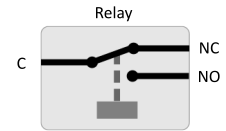
When the relay is switched off there is a closed circuit between C and NC, and an open circuit between C an NO.
When the relay is switched on there is a closed circuit between C and NO, and an open circuit between C an NC.
Wire the relay terminals to an external device as necessary in order to achieve the desired signal/control.
Notice
Note: The programmable relay function only works when AC input power is available and charging is enabled. If charging is disabled by any means (the remote on/off terminals, via VictronConnect or a GX device) the programmable relay functionally will also be disabled.
5.3. Schematics
5.3.1. Basic install
Refer to the wiring schematic below to connect a multiple (3) output Smart IP43 Charger to multiple independent batteries / battery banks:
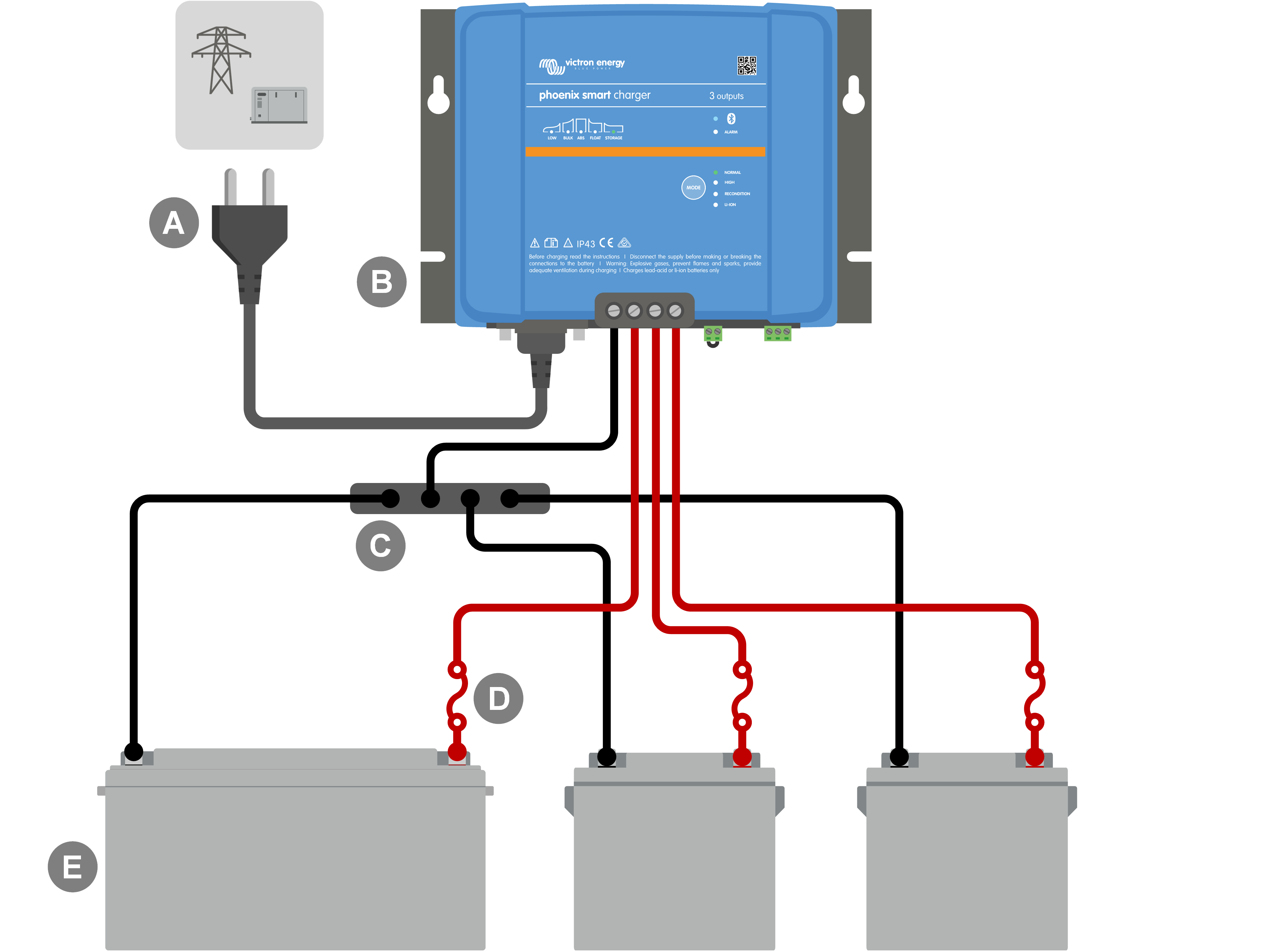
Key | Description |
|---|---|
A | AC power supply (mains power grid, generator or inverter) |
B | Smart IP43 Charger (3 output model) |
C | DC negative busbar |
D | Fuses / circuit breakers x3 (locate as close as practical to batteries) |
E | Batteries / battery banks x3 (any combination of 1, 2 or 3 batteries) |
Refer to the wiring schematic below to connect a main and aux (1+1) output Smart IP43 Charger to a main battery / battery bank and an optional auxiliary battery:
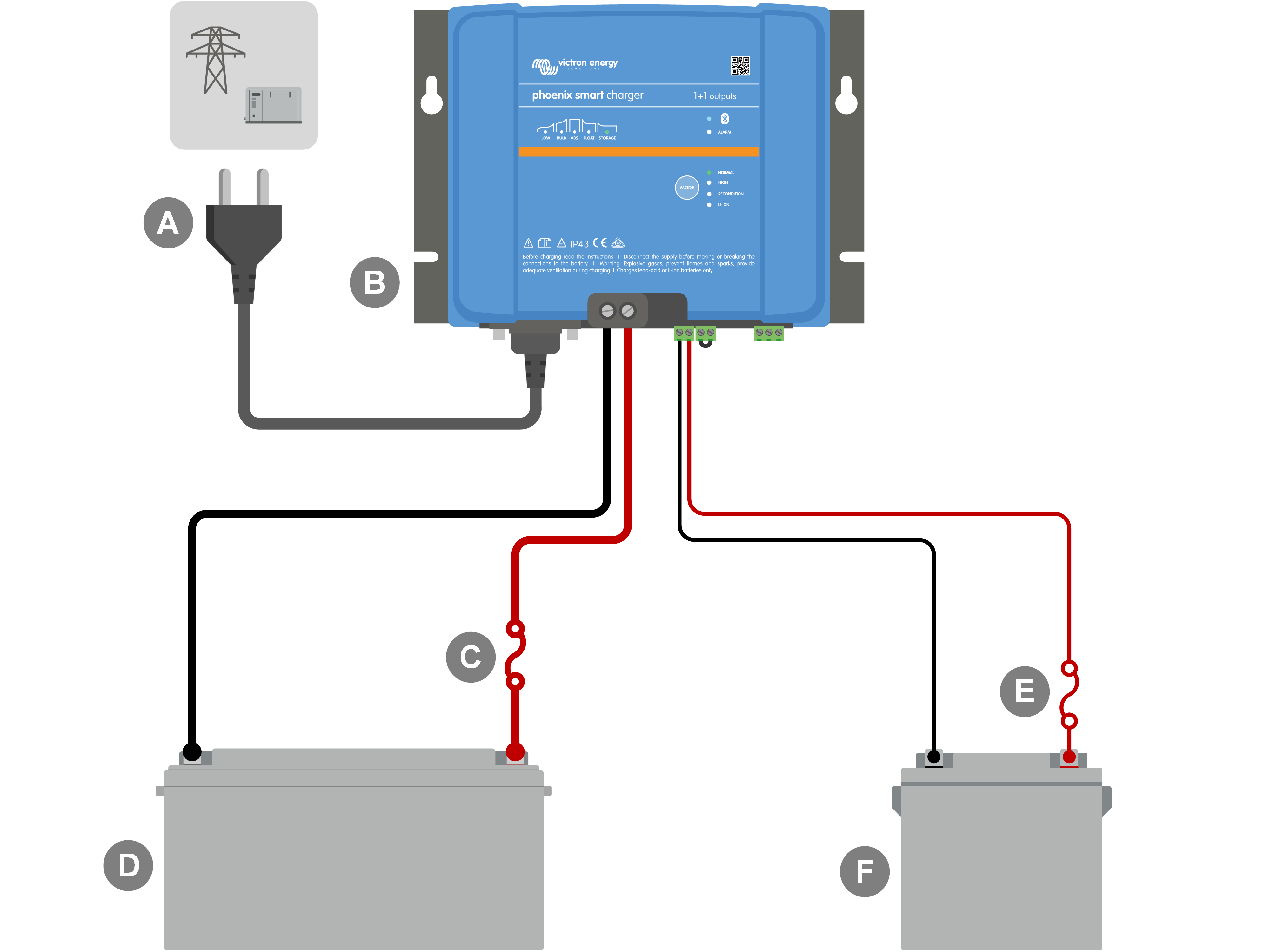
Key | Description |
|---|---|
A | AC power supply (mains power grid, generator or inverter) |
B | Smart IP43 Charger (1+1 output model) |
C | Fuses / circuit breakers x2 (locate as close as practical to batteries) |
D | Main battery / battery bank |
E | Auxiliary battery (auxiliary battery and related wiring is optional) |
5.3.2. System with Smart Battery Sense
Refer to the wiring schematic below to connect a Smart IP43 Charger (1+1 output model) to a main battery / battery bank and an optional auxiliary battery, with a Smart Battery Sense in the system:
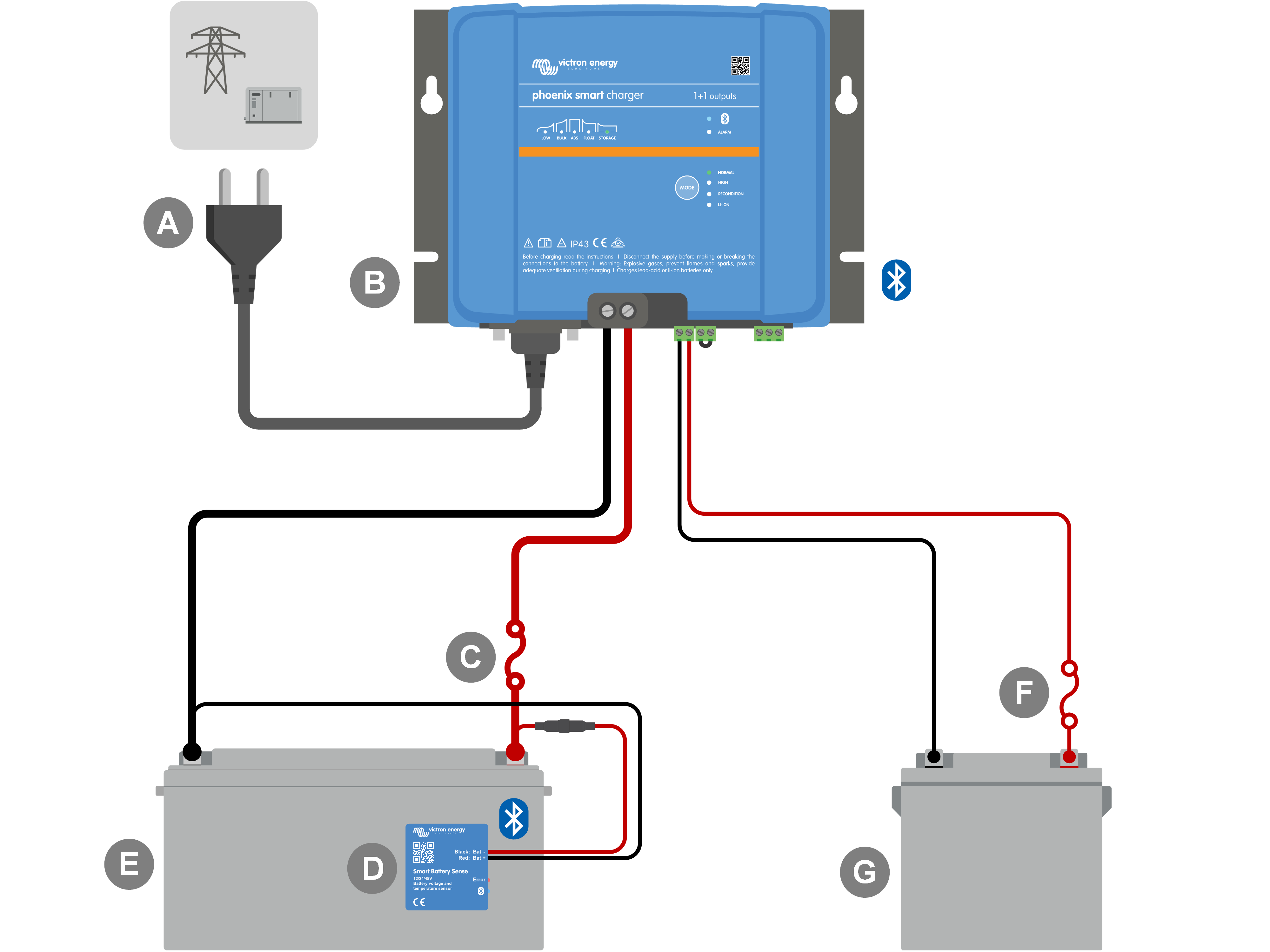
Key | Description |
|---|---|
A | AC power supply (mains power grid, generator or inverter) |
B | Smart IP43 Charger (1+1 output model) |
C | Fuses / circuit breakers x2 (locate as close as practical to batteries) |
D | Smart Battery Sense |
E | Main battery / battery bank |
F | Auxiliary battery (auxiliary battery and related wiring is optional) |