6. Troubleshooting
6.1. LEDs, Warnings, Alarms & Error Codes
LEDs
The battery is equipped with two indicator LEDs: the Bluetooth Status LED and the Error LED. These LEDs indicate the current operating state of the battery and signal any warnings or faults. |  |
The following tables list all LED indications and their meanings.
Bluetooth Status LED | Description |
|---|---|
Off | The battery is switched, or Bluetooth is disabled in the VictronConnect app. |
Blue on | A Bluetooth device is connected. |
Blue blinking | Bluetooth is active but no device is connected. |
Error LED | Description |
|---|---|
Off | No warning/alarm/error active. |
Red blinking | A warning is active. |
Red on | An alarm and/or error is active. |
During a firmware update, the Bluetooth and Error LEDs blink simultaneously, indicating that the update is in progress.
Warnings, Alarms & Error Codes
|
|
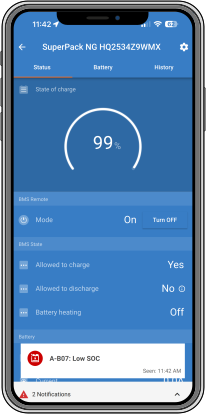
Warning codes
VictronConnect warning code | Message | Instructions / Remarks |
|---|---|---|
W-B01 | Low cell voltage | Charge the battery or reduce the load to prevent an imminent system shutdown. |
W-B02 | High current | Reduce the current to prevent an imminent system shutdown. Do this byreducing the load or by turning loads off. |
W-B05 | Communication battery lost (cellpack | Internal communication failing. Contact your dealer |
W-B06 | Load will disconnect | The loads will be turned off if the fault is not resolved, for example due to low battery voltage. This warning is always shown together with the reason for the impending load disconnection. |
W-B07 | Low SoC | Charge battery or reduce load to prevent imminent system shutdown. |
W-B11 | Cellguard Firmware cannot be updated | Follow recovery document (cellguard could not enter bootloader mode and needed a powercycle) |
Alarm codes
VictronConnect alarm code | Message | Instructions / Remarks |
|---|---|---|
A-B01 | Low cell voltage | Charge battery or reduce load to prevent imminent system shutdown. |
A-B02 | High current | Reduce charging current or turn off some loads. The system will try to reenable chargers or loads in 5 minutes. |
A-B03 | High BMS temperature | Check the ambient temperature and verify that the cooling fans are operating. |
A-B06 | Load disconnected | The loads have been turned off via ATD. Resolve this alarm by charging the battery. |
A-B07 | Low SoC | Charge battery. The system will turn the loads back on when the battery is sufficiently charged. |
A-B09 | High battery temperature | The battery temperature is too high. Try to reduce the ambient temperature. |
A-B13 | Low battery temperature | The Battery temperature is too low. Try to increase the ambient temperature. |
Error codes
VictronConnect error code | Message | Instructions / Remarks |
|---|---|---|
E-B11 | Hardware error | Contact your Victron dealer. |
E-B25 | Pre-charge error | The load resistance is too low to pre-charge the loads. Disconnect or reduce some DC loads. |
E-B35 | Pre-charge timeout | The load capacity is too high to pre-charge. Disconnect some DC loads. |
E-B42 | High cell voltage | |
E-B43 | External disconnection signal | EFS signal has been triggered. Internal Fatal Error. Disconnect the battery from load and chargers immediately. Contact your dealer. |
E-B44 | Battery safety lock | 1) Check cell voltages. 2) Turn the product off and back on again, after issue has been solved. |
E-B116 | Calibration lost | Contact your dealer. |
E-B119 | Settings data lost | Go to the settings page and reset to factory defaults. Bluetooth bonding information will also reset and product must be removed from paired devices. |
6.2. Self-restoring protection mechanisms
The SuperPack NG battery includes several protection mechanisms that automatically disable charging and/or discharging when unsafe conditions are detected. In most cases, the battery attempts to recover automatically once the condition is removed. This section explains the behaviour of these self-restoring protections and when manual intervention is required.
Short circuit protection
A short circuit is detected and interrupted by the hardware protection. When this occurs, the firmware attempts to recover automatically by performing a pre-charge sequence.
The battery performs up to three pre-charge attempts, with a 30-second pause between each attempt.
If, after three attempts, the short-circuit condition is still present and the output voltage does not rise, a pre-charge error (E-B25) is raised. In this state, both charging and discharging are disabled.
If the short-circuit condition is later removed (the load voltage drops below the defined threshold), charging and discharging are automatically re-enabled.
If, during the recovery attempts, the output voltage does rise but normal operation cannot be fully restored, a pre-charge timeout is raised. In this case, discharging is disabled while charging remains allowed.
After a pre-charge timeout, the battery waits 10 minutes before repeating the pre-charge sequence (three attempts). This cycle is repeated automatically until the output can be enabled again.
Overcurrent protection
If an overcurrent condition is detected during charging or discharging, the affected action is disabled immediately. Overcurrent protection is activated within 5 seconds once the detected current exceeds the maximum continuous current threshold. The intervention time is reduced if the detected current exceeds 3C.
After a delay of up to 5 minutes, charging or discharging is automatically re-enabled. If an overcurrent condition is detected again, the same process is repeated.
There is no permanent lockout for overcurrent protection. The battery will continue to disable and re-enable charging or discharging in 5-minute cycles until the overcurrent condition is resolved.
Low-voltage protection
The BMS automatically disconnects the loads and prevents discharging when the low-voltage cut-off is reached. A warning (W-B01) is issued. If the condition is not cleared within 30 seconds, ATD (discharge) is disabled and an alarm (A-B01) is raised.
The status is cleared once the battery returns within the operational range.
Temperature protection behaviour
Over-temperature and under-temperature protections are self-restoring. Charging and/or discharging are automatically re-enabled once the battery temperature returns within the specified operating range. No manual intervention is required.
Low-voltage safety lock-down
The low-voltage safety lock-down is an additional layer of protection that can occur if the cells continue to discharge due to self-discharge.
If a cell voltage drops below the safety lock-down threshold, discharging is disabled. After 30 seconds, charging is also disabled and the Battery Safety Lock error (E-B44) is triggered.
Important
This condition is not self-restoring. Recovery is only possible by performing a full power cycle of the battery after the underlying cause has been resolved.
Warning
Avoid allowing the battery to reach this state. Deep discharge can cause permanent cell damage and may invalidate the warranty. Always ensure the battery remains sufficiently charged, especially during storage. If this condition does occur, follow the Very low battery voltage recovery procedure in the next section.
6.2.1. Very low battery voltage recovery procedure
If a battery is discharged too deeply, its terminal voltage can fall well below the nominal 12 V (24 V or 48 V). If the battery voltage drops below 10 V (20 V or 40 V for 24 V and 48 V systems respectively), or if any cell voltage falls below 2,5 V, permanent battery damage may occur. This condition invalidates the warranty. The lower the battery or cell voltage, the more severe the damage is likely to be.
In such cases, it may be possible to attempt recovery using the low-voltage recharge procedure described below. However, recovery is not guaranteed. There is a realistic risk that the battery has suffered permanent cell damage, which may result in moderate to severe capacity loss even if recovery appears successful.
Low-voltage recovery charge procedure
This recovery procedure must only be performed on a single battery. If the system contains multiple batteries, disconnect them and repeat the procedure individually for each battery.
Warning
This process is potentially hazardous. A supervisor must be present at all times.
Set the charger or power supply to:
13,8 V for 12 V batteries
27,6 V for 24 V batteries
55,2 V for 48 V batteries
If any cell voltage is below 2,0 V, charge the battery with a current of 0,1 A until the lowest cell voltage rises to at least 2,5 V.
Closely monitor the battery during this phase. If the battery becomes hot or starts to bulge, stop charging immediately. In this case, the battery is irreparably damaged and must not be used further.
Once the lowest cell voltage has risen above 2,5 V, increase the charge current to 0,1 C.
For a 100 Ah battery, this corresponds to a charge current of 10 A.For a 100Ah battery, this is a charge current of 10A.
Record the initial battery terminal voltage and individual cell voltages.
Start charging.
During this phase, the BMS may repeatedly switch the charger on and off. This behaviour is normal when there is a significant cell imbalance.
Record the battery and cell voltages at regular intervals. The cell voltages should begin to rise during the first part of the charging process.
If the voltage of any cell does not increase within the first 30 minutes, stop the procedure and consider the battery unrecoverable.
Monitor the battery temperature regularly.
If a sharp temperature increase is observed, stop charging immediately and consider the battery unrecoverable.
Once the battery reaches:
13,8 V (27,6 V or 55,2 V),
increase the charge voltage to:
14,2 V (28,4 V or 56,8 V),
and increase the charge current to 0,5 C.
For a 100 Ah battery, this corresponds to a charge current of 50 A.
During this stage, the cell voltages will rise more slowly. This is normal.
Leave the charger connected for 6 hours.
Afterwards, check the cell voltages. They should be within 0,1 V of each other.
If one or more cells show a significantly higher deviation, consider the battery damaged.
Disconnect the charger and allow the battery to rest for several hours. Then measure the battery voltage. It should stabilise well above:
12,8 V (25,6 V or 51,2 V),
typically around:
13,2 V (26,4 V or 52,8 V) or higher.
The cell voltages should still be within 0,1 V of each other.
Allow the battery to rest for 24 hours and measure the voltages again.
If the battery voltage has fallen below 12,8 V (25,6 V or 51,2 V), or if a noticeable cell imbalance is present, the battery should be considered damaged beyond recovery.
6.3. ATC / ATD off-reasons in VictronConnect
When Allow To Charge (ATC) or Allow To Discharge (ATD) is inactive, VictronConnect displays a specific off-reason explaining why charging or discharging is currently disabled.
The off-reason can be viewed by tapping the circled “i” icon shown next to the ATC or ATD status when it indicates “No”.
Off-reasons can result from internal battery protection mechanisms, configuration settings, temperature limits, remote control inputs, or system error conditions. Each off-reason is accompanied by a short description and, where applicable, guidance on corrective actions.
Depending on the condition, an off-reason may apply to ATC, ATD, or both. Reviewing the off-reason helps determine whether the restriction is temporary, configuration-related, or caused by a protection or fault condition, and supports correct troubleshooting.
The following table provides an overview of all possible ATC and ATD off-reasons as shown in VictronConnect.
VictronConnect off-reason | Description | Advice | Trigger condition | ATC | ATD |
|---|---|---|---|---|---|
#1: Disabled by battery | Battery prevents [charging | discharging]. This may occur if there is no communication with the battery (yet) or if the battery configuration is invalid. | No battery communication Invalid battery configuration Invalid battery voltage | Yes | Yes | |
#3: High temperature | The temperature is too high. This is a part of the battery protection mechanism and it is not necessarily indicating a problem. | Check the ambient temperature and/or whether the fans are running. | FET temperature too high Cell overtemperature | Yes | Yes |
#5: Internal reason | The device is in alarm state and it is preventing normal operation. | Check the alarm notifications and take the appropriate actions to clear it. | System error (User Settings Failure, Calibration Data Lost, ATC/ATD Failure, External Disconnection Signal) | Yes | Yes |
#6: Overloaded | Pre-charge timeout (ATD only) or pre-charge error | Yes | Yes | ||
#8: Disabled by the user | Remotely switched off by VictronConnect. | Check that the 'On/Off' settings are configured as desired. | Switched off via VictronConnect | Yes | Yes |
#9: Low temperature | The temperature is too low. This is part of the battery protection mechanism and it is not necessarily indicating a problem. | Cell undertemperature | Yes | Yes | |
#10: High voltage | Voltage level of one or more cells is too high. | Cell overvoltage | Yes | No | |
#11: Low voltage | Voltage level of one or more cells is too low. | Battery bank undervoltage Cell undervoltage | No | Yes | |
#12: High current | [Charge | Discharge] current is too high. | Battery overcurrent | Yes | Yes | |
#13: Low SoC | SoC below discharge floor | No | Yes |