Lithium SuperPack NG manual

4. Configuration & Settings

In this section:

4.1. Configuration of chargers and loads

Before turning on the system, ensure that chargers and loads are correctly configured, particularly their maximum combined charge and combined discharge currents, to avoid exceeding battery limits.

In addition, configure the chargers for LiFePO₄ (LFP) chemistry and set the charge voltages and related parameters according to the values listed in the Battery Specification chapter. Use the full charge algorithm (bulk, absorption and float, where applicable) and do not use profiles intended for lead-acid batteries.

Before first use, run one complete full charge sequence. This allows the battery to initialise correctly and ensures the state-of-charge indication is accurately displayed in VictronConnect.

Maximum charge current

The maximum continuous charge current is 1C.

Tip

For optimal battery performance and lifespan, a charge current of 0.3C is recommended.

Maximum discharge current

The maximum continuous discharge current is 2C.

Tip

For optimal battery performance and lifespan, a discharge current of 0.5C is recommended.

4.2. Lithium SuperPack NG battery settings

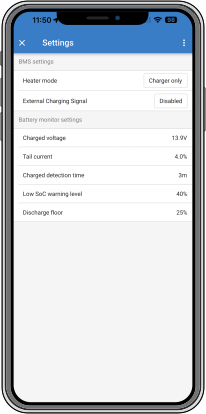
Once powered up, use the VictronConnect app to configure the battery settings.

BMS Settings

  • Heater mode:

    • Auto: The heater turns on when the temperature is too low to charge, even if no charger is connected. This uses battery energy.

    • Charger only: The heater turns on only when a charger is connected, preserving battery energy.

  • External Charging Signal: Disabled by default. When enabled, the EFS is triggered when the Low SoC warning threshold, configurable in the VictronConnect app, is reached. When active, the EFS remains continuously high at battery positive voltage. The signal is cleared if a protection is triggered, the Discharge floor threshold is reached, or the SoC rises at least 1% above the warning level.

Battery monitor settings:

Unlike other battery monitors, the Lithium SuperPack NG battery has mostly fixed settings that cannot be customised.

  • Charged voltage: The voltage above which the battery monitor synchronises and resets SoC to 100%, provided tail current and charged detection time conditions are met.

  • Tail current: The current below which the battery monitor synchronises and resets SoC to 100%, provided charged voltage and charge detection time conditions are met. Default: 4%, adjustable if needed.

  • Charged detection time: The duration charged voltage and tail current must be met for SoC synchronisation. Default: 3 minutes, adjustable if needed.

  • Low SoC warning level: The level at which a warning is issued before the discharge floor has been reached.

    A warning is displayed in VictronConnect and the red LED starts blinking when the warning is active.

  • Discharge floor: This parameter has two functions:

    • It defines the minimum state of charge (SoC) to which the battery may be discharged, ensuring that sufficient energy remains for self-discharge after Allowed to Discharge (ATD) is disabled.

      It limits the depth of discharge to extend battery life and maintain reserve capacity, for example, to supply backup power in solar systems until recharging resumes.

      When the discharge floor is reached, a Low SoC alarm is triggered in VictronConnect, the red LED lights up continuously, and Allowed to Discharge (ATD) is disabled, preventing further discharge until the SoC rises above the defined threshold.

      Setting the discharge floor to zero (not recommended) disables this protection feature.

      Caution

      The discharge floor prevents full discharge and should be set to retain enough energy for self-discharge until recharging is possible.

    • It determines the ‘Time remaining’ value in the VictronConnect app, calculated based on the actual discharge current and the set discharge floor.

SuperPack_NG_VC_4.svg