5. Operation
5.1. Monitoring & Control via VictronConnect
The battery is monitored and controlled using the VictronConnect app.
VictronConnect provides three pages for this purpose: Status, Battery, and History. Each page displays specific parameters, which are explained below.
On Android phones or tablets, VictronConnect also allows additional monitoring options. Home screen widgets can be added to display key information from Victron Bluetooth Smart devices such as the SuperPack NG battery at a glance.
VictronConnect also supports Android Auto, allowing key information from Victron devices, such as the SuperPack NG battery, to be shown on the vehicle’s infotainment display. Any Victron devices listed under “My devices” in the VictronConnect device list are available on the Android Auto screen. For details, refer to the VictronConnect manual.
Status page: The Status page displays real-time information about the battery.
| 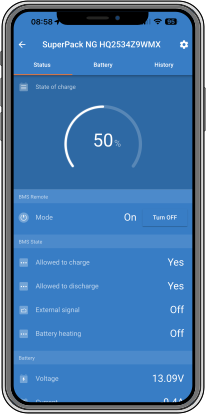 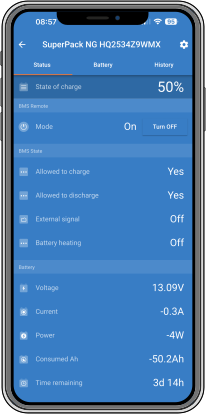 |
Battery page: The Battery page provides information about the battery and detailed data. Battery information
| 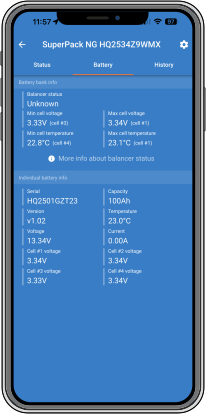 |
History page: The History page displays long-term battery statistics since installation or the last history reset. The history data can be reset using the Reset history button at the bottom of the page. However, the history should not be reset, as this data is essential for diagnosing potential battery issues.
| 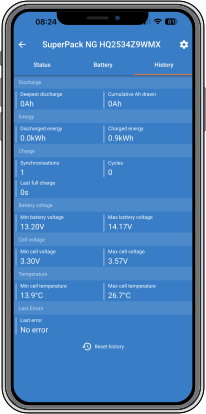 |
5.1.1. Instant Readout
VictronConnect can display key battery data directly on the Device List page—without needing to connect to the product. This includes visual notifications for warnings, alarms, and errors, allowing quick diagnostics at a glance.
Instant Readout is disabled by default and must be enabled if you wish to display this data. When VictronConnect is first installed, you will be prompted to enable the feature.
Available parameters:
| 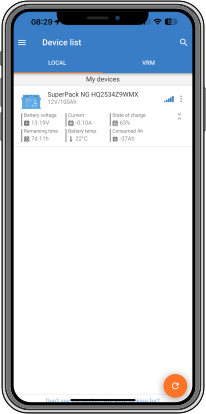 |
For details on enabling Instant Readout, refer to the VictronConnect manual, available on the VictronConnect download page.
5.2. Charging
The Lithium SuperPack NG battery can be charged with any battery charger, provided it has a Lithium Iron Phosphate (LFP) charging profile, or a user-defined preset.
Using the correct charging parameters ensures optimal performance, safety, and service life. Refer to the Battery Specification for the detailed charging settings.
Charging characteristics
The Bulk/Absorption voltage defines the level at which the battery is charged to full capacity. Once this voltage is reached, the current will gradually decrease until the battery is fully charged and the cells are balanced.
The Float voltage maintains the battery at full charge without overcharging it. This stage can be held indefinitely when the system is on standby or under light load.
Charging stops automatically when the internal Battery Management System (BMS) detects that all cells are balanced and fully charged.
Charging conditions
Charging is only permitted when the battery temperature is between 0 °C and 60 °C. Below or above this range, the BMS will block charging to protect the cells.
When the temperature is too low for charging, the internal heater activates when a charger is connected (default setting). Charging will resume as soon as the cell temperature is above 0 °C.
The battery may be charged from any DC source, including alternators, DC-DC chargers, solar charge controllers, or mains-powered chargers, as long as the voltage and current limits are within specification.
When the battery is switched off via the VictronConnect app or the on/off push button, charging and discharging are disabled. Switching the battery off via the app keeps the Bluetooth connection active and is therefore not suitable for long-term storage.
Recondition or equalisation modes must not be used, as they apply voltages too high for LFP chemistry.
Solar charging
When charging from a solar system, use an MPPT solar charge controller with the appropriate LFP profile (for example, Victron SmartSolar or BlueSolar).
Ensure that the charge controller’s voltage limits match the recommended values shown in the table above.
Alternator charging
When charging from an engine alternator, the alternator must be protected from overload.
Use a DC-DC charger between the alternator and the battery to limit current and voltage.
Victron DC-DC chargers (such as the Orion-Tr Smart and Orion XS series) provide a safe and efficient solution for LFP charging from alternators.
5.3. Discharging
The SuperPack NG battery can supply power to DC systems or inverters within the specified limits. The BMS continuously monitors voltage, current and temperature to ensure safe and reliable operation.
Discharge characteristics
The battery can deliver high discharge currents up to 2C. The duration for which this current can be sustained depends on several factors, including State of Charge (SoC), State of Health (SoH), and ambient temperature.
In a typical application (ambient temperature around 25 °C and 100 % SoC), 2C can be sustained for up to 10 minutes.
For continuous operation and system sizing, a discharge rate of 0.5C is recommended to reduce heat build-up, prevent component overheating, avoid triggering temperature-related protections, and optimise battery lifespan.
2C should be considered for peak power demand.
Currents exceeding 2C will trigger overcurrent protection, with only short transient peaks (lasting a few seconds) permitted.
The BMS automatically disconnects the loads and prevents discharging when the low-voltage cut-off is reached. A warning (W-B01) is issued. If the condition is not cleared within 30 seconds, ATD (discharge) is disabled and an alarm (A-B01) is raised.
The status is cleared once the battery returns within the operational range.
Discharge is automatically re-enabled once the battery voltage or temperature returns to a safe level.
Discharge conditions
Discharging is only permitted when the internal battery temperature is between −30 °C and 60 °C. Outside this range, the BMS disables discharging to protect the cells.
When the battery is switched off via the VictronConnect app or the On/Off push button, discharging is disabled.
Recommended practices
Avoid deep discharges below 10 % SoC whenever possible.
Use the Low SoC warning level and Discharge floor settings to limit the depth of discharge. A reduced discharge depth improves battery longevity and maintains reserve capacity for backup power.
Regularly review discharge data in the VictronConnect history page to identify abnormal usage patterns.
During extended storage, disconnect all loads to prevent over-discharge caused by parasitic consumption. The best practice is to switch the battery off using the push button, as this also disables the internal Bluetooth interface.
5.4. Reset to factory defaults
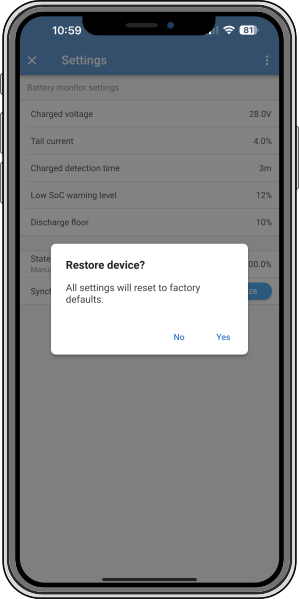
The Lithium SuperPack NG battery can be reset to factory settings via the VictronConnect app.
How to reset:
Open VictronConnect
Tap the cogwheel icon to access Settings.
Tap the three vertical dots in the Settings menu.
Select Reset to defaults, then confirm with Yes.
The following settings will be restored to their default values:
|  |
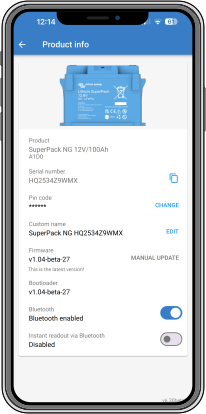
5.5. Bluetooth reactivation
If Bluetooth has been deactivated for the battery in VictronConnect, for example for security reasons, it can be reactivated as follows:
|  |