2. Introduction
The VM-3P5A energy meter is a standard device to measure the power and energy of single-, split- and three-phase applications and calculates each phase's power values and broadcasts this over VE.Can or Ethernet with a high rate.
It supports industry-standard 5 A current transformers (not included) and is self-powered from all phases (N-L1-L2-L3). Built-in Ethernet and VE.Can ports enable direct connection to a GX device.
The energy meter works out of the box (the firmware may need to be updated; details can be found in the Firmware Updates chapter) as a grid meter for systems with a MultiPlus, Quattro, Multi RS and Multi HS. Configuration (via VictronConnect) is only required for changing the role and manual IP configuration rather than the default DHCP.
Its data is displayed on a GX device such as the Cerbo GX or Ekrano GX , as well as in VictronConnect and our VRM Portal.
2.1. Features
Supports industry-standard 5 A current transformers (not included)
Modbus/UDP communication over Ethernet
Support for 1-phase, split-phase and 3-phase configuration
Configurable total energy registration: vector, arithmetic, or absolute
Reports:
line-to-neutral voltage
line-to-line voltage
power factor (according to IEEE convention)
phase sequence (for 3-phase configuration)
phase rotation warning (for 3-phase configuration)
protective earth voltages
neutral and line currents
Status LED can be set as a pulse counter for quick, at-a-glance diagnostics
The VM-3P5A can be configured for various roles in a GX device, such as the Cerbo GX or the Ekrano GX. Depending on the application, it can be used:
as a grid meter, providing control input for an Energy Storage System (ESS)
to measure the output of a PV inverter
to measure the output of an AC genset
as an AC meter to measure a dedicated AC load circuit
to track an EV charger
to track a heat pump
It offers two options for connection to a GX device:
A wired Ethernet connection to the local network via the built-in Ethernet port, allowing the GX device to communicate with it.
A wired VE.Can connection via the onboard VE.Can port, directly linking it to the GX device.
2.2. What's in the box?
Victron VM-3P5A with 3 input terminal blocks | 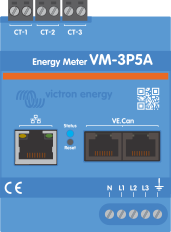 |
VE.Can terminators (2 pcs) |  |