4. Installation
4.1. Mounting
Mount vertically on a non-flammable surface, with the power terminals facing downwards.
Observe a minimum clearance of 10 cm under and above the product for optimal cooling.
Mount close to the battery, but never directly above the battery to prevent damage due to gassing of the battery.
Please see the Appendix of this manual for the dimension drawing; this drawing also indicates the mounting holes.
4.2. Cable and fuse recommendations
Caution
Use flexible multi-stranded copper cables for the battery connections.
The diameter of the individual strand of the cable used should not exceed 0.4mm (0.016 inch) or have a surface area exceeding 0.125mm² (AWG26).
The maximum operating temperature is 90°C (194°F).
A 16mm² cable, for example, should have at least 122 strands (class 5 or higher stranding according to VDE 0295, IEC 60228 and BS6360). Example of suitable cable: class 5 “Tri-rated” cable (it has three approvals: American (UL), Canadian (CSA) and British (BS)).
In the case of thicker strands, the contact area will be too small, and the resulting high contact resistance will cause severe overheating, eventually resulting in fire. See the below figure for examples of what cable to use and not to use.
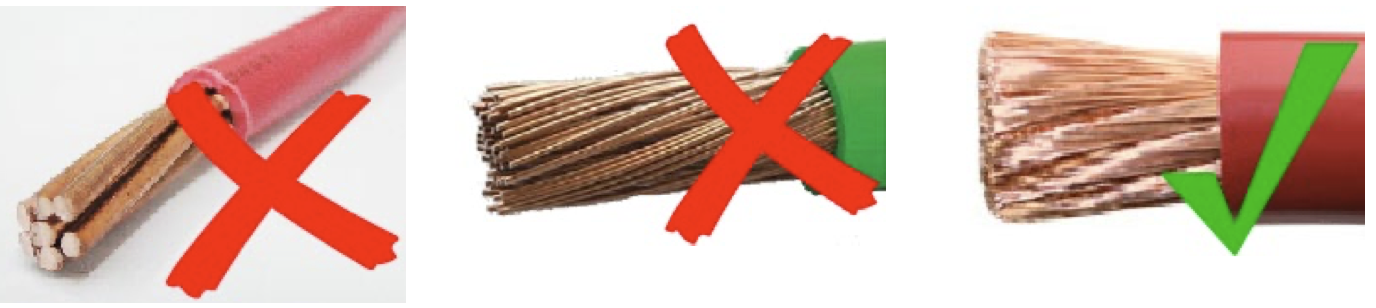
Cable type recommendation
For correct connection of a cable to the input/output screw terminals, stranded wires with flexible and very flexible cores can be used according to:
IEC 60228 - Class 2 (stranded), Class 5 (flexible), Class 6 (very flexible)
UL486A-B - Class B/C (stranded), Class I (flexible), Class K (very flexible)
Cables with twisted cores are very stiff, which means that they are rarely used in practice. The table below provides an overview of how to recognise the different wire classes.
Single wire diameter in the bundle | ||||
|---|---|---|---|---|
Nominal cross-section | Class 5 (IEC) | Class 6 (IEC) | Class I (UL) | Class K (UL) |
9AWG | 24AWG | 30AWG | ||
6mm2 | 0.3mm | 0.2mm | ||
7AWG | 24AWG | 30AWG | ||
10mm2 | 0.4mm | 0.2mm | - | - |
6AWG | - | - | 24AWG | 30AWG |
16mm2 | 0.4mm | 0.2mm | - | - |
4AWG | - | - | 24AWG | 30AWG |
The use of ferrules is not required for cables from the above table. If an even thinner cable is used, a ferrule can help to bundle the loose wires. However, it is up to the installer to make sure that the cable is properly secured. With or without a ferrule, the connecting cable must be adequately clamped to ensure low contact resistance.
Preparation for correct mounting of fine strand wires in the screw terminal block
Cut the cable straight with no loose or staggered threads. Using a wire cutter will result in a straight cut.
Make sure no fine wires are cut when stripping the insulation.
Open the screw on the screw terminal block completely to prevent fine wires from getting caught behind the screw and bunching up. Pay particular attention to this when using the maximum wire diameter.
Tighten the screw with the correct torque; see Recommended torque and note the wire size and wire class. Never apply less than the recommended torque.
Hold the recommended torque for at least 5 seconds, this will give the screw time to settle to the set torque. This maximises the force on the wire, thereby maintaining a gas-tight contact pattern during heating and cooling cycles over time. Take the time to do it right. This is important. This is a UL486 test requirement and a requirement for all factory and field installations.
Fuse recommendation
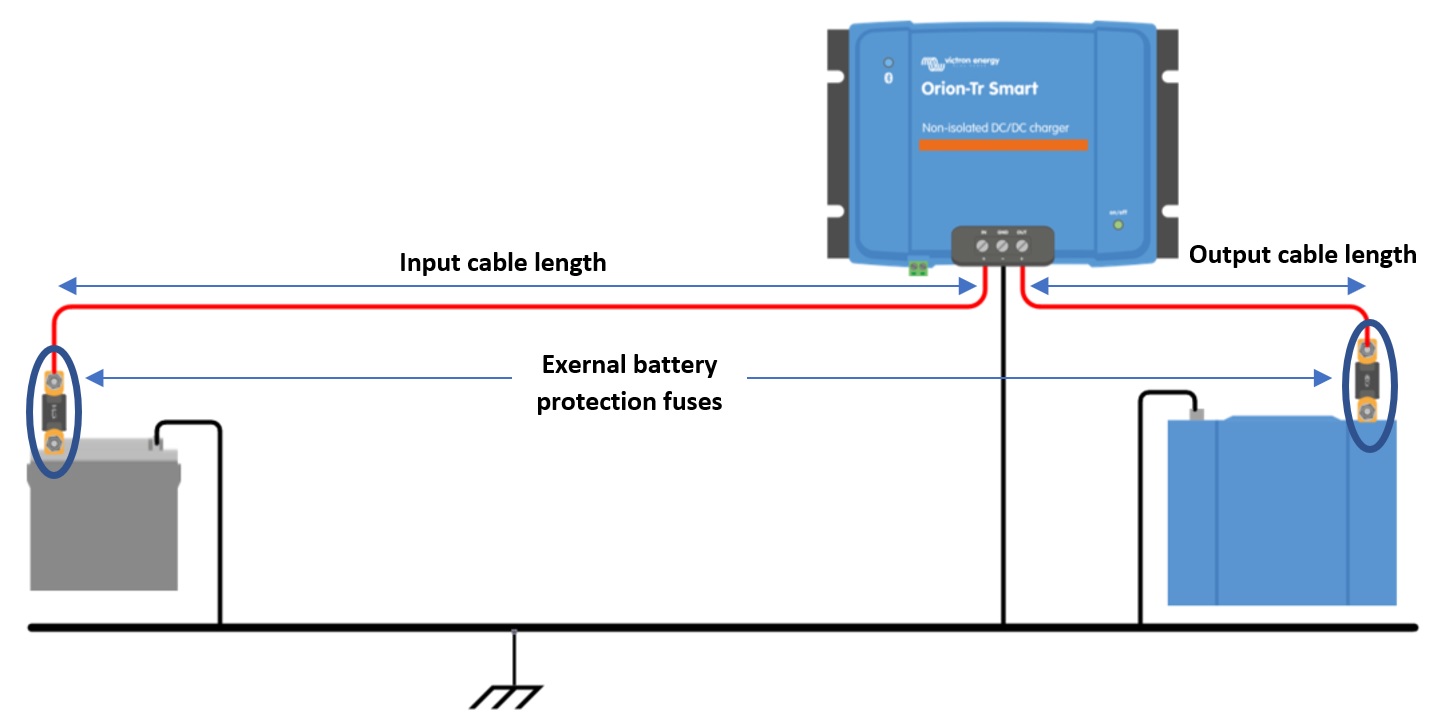 |
Figure 6: Cable and fuse recommendations |
Minimum cable gauge | ||||||
|---|---|---|---|---|---|---|
Voltage rating (Input or output) | External battery protection Fuse | 0.5m | 1m | 2m | 5m | 10m |
12V | 60A | 6mm2 | 10mm2 | 10mm2 | 16mm2 | 16mm2 |
24V | 30A | 4mm2 | 6mm2 | 6mm2 | 10mm2 | 10mm2 |
48V | 20A | 2.5mm2 | 4mm2 | 4mm2 | 6mm2 | 6mm2 |
4.3. Polarity check before connecting the battery
Warning
The Orion Smart DC-DC Charger is not protected against reverse battery polarity; any damage caused by this is not covered under warranty. A device damaged by reverse polarity cannot be repaired.
Always verify the battery polarity before connecting or reconnecting the battery cables to the Orion smart charger.
Do not attempt to attach the battery cables to the Orion unless the input and output terminals are safely accessible.
Be careful not to bend individual strands when inserting the cables into the input and output terminals.
Connect the battery cables to the Orion first, verify battery polarity again and only then connect the battery.
Note
A device damaged by reverse polarity cannot be repaired. Do not attempt to open the device. The device is potted and contains no serviceable parts or fuses that can be replaced.
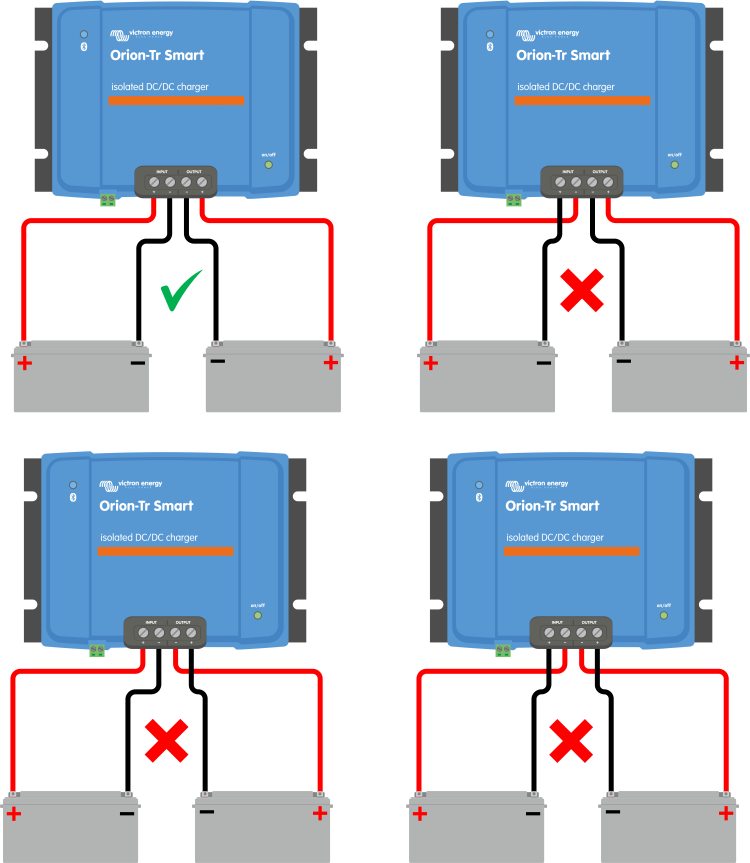
4.4. Recommended torque
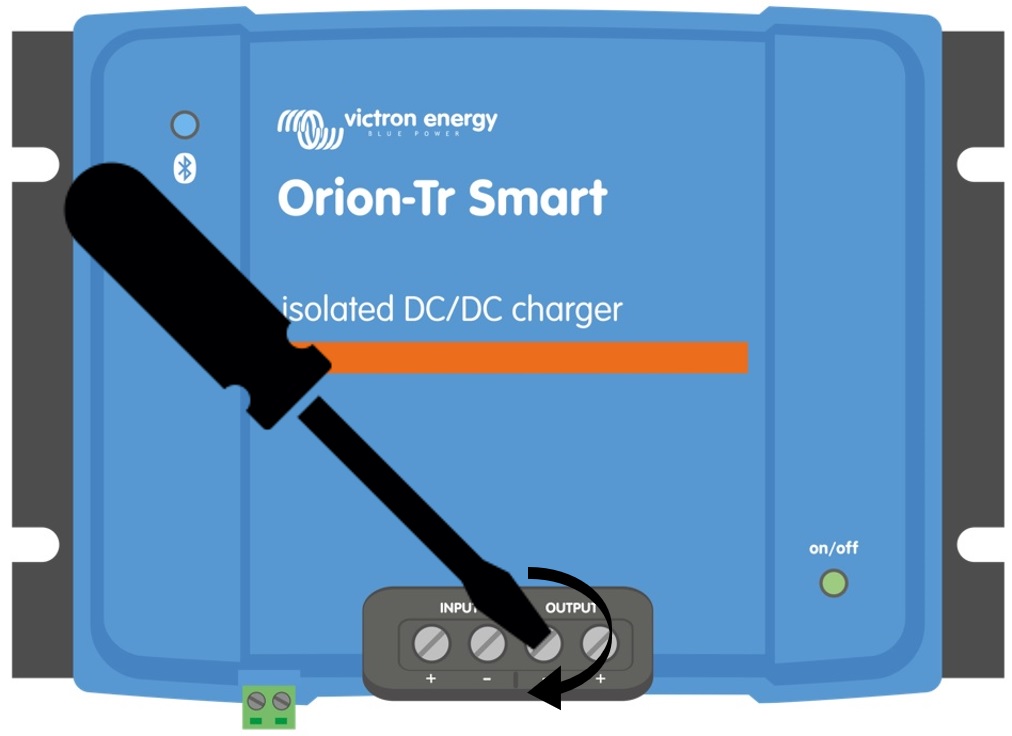 |
Torque: 1.6 Nm
4.5. Connection setup for DC-DC power supply mode
Disconnect the remote on/off; remove the wire bridge or unplug the terminal block.
Connect the input supply cables.
Open the VictronConnect App to set up the product, see Power Supply Mode (always adjust the output voltage before connecting in parallel or connecting a battery).
Connect the load. The Orion is now ready for use as a power supply.
Reconnect the remote on/off to activate the product.
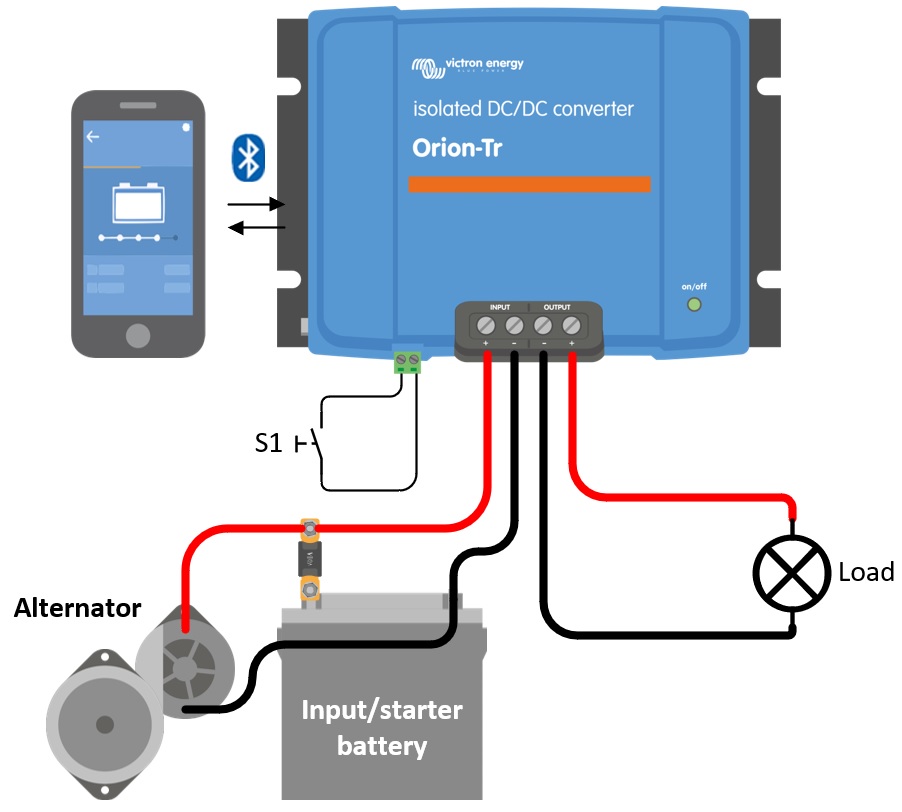
Figure 1: Typical connection setup as DC-DC power supply
4.6. Connection setup for charger mode
Disconnect the remote on/off; remove the wire bridge or unplug the terminal block.
Connect the input supply cables.
Open the VictronConnect App to set up the product, see Charger Mode (always set up the correct charger algorithm before connecting a battery).
Connect the battery to be charged.
Reconnect the remote on/off to activate the product.
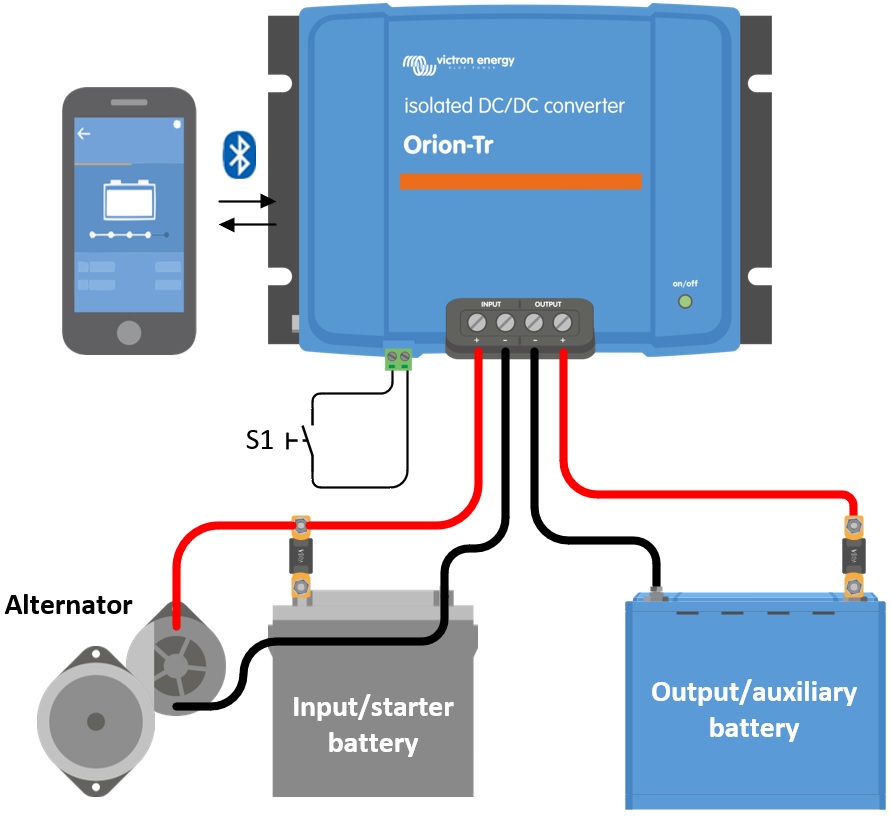
Figure 2: Typical connection setup as charger
4.7. Remote on/off wiring
The remote on/off function switches the on and off via the two-pole remote connector (L- and H-pin), without the need to interrupt the heavy DC cabling. It gives the versatility to choose from four wiring options, depending on what is available in the installation: a simple switch, a switched positive or negative signal already present in the system, or a BMS charge control contact.
Note
The is delivered with a wire loop (bridge) installed between the L- and H-pin. With the wire loop in place, the unit is always on. To switch the unit on and off remotely, remove the wire loop and use one of the options below.
The following wiring options are available:
a) A switch wired between the L-H pins (On-level impedance between L-H pins: < 500kΩ)
b) A switch wired between (input/starter) battery plus and H-pin (on level: > 3V)
c) A switch between the L-pin and (input/starter) ground (on level: < 5V)
d) Isolated remote on/off cable e.g. controlled by a (small)BMS
Notice
Voltage tolerance L & H pin: +/- 70VDC
a) L-H pin wiring | b) H-pin wiring | c) L-pin wiring | |
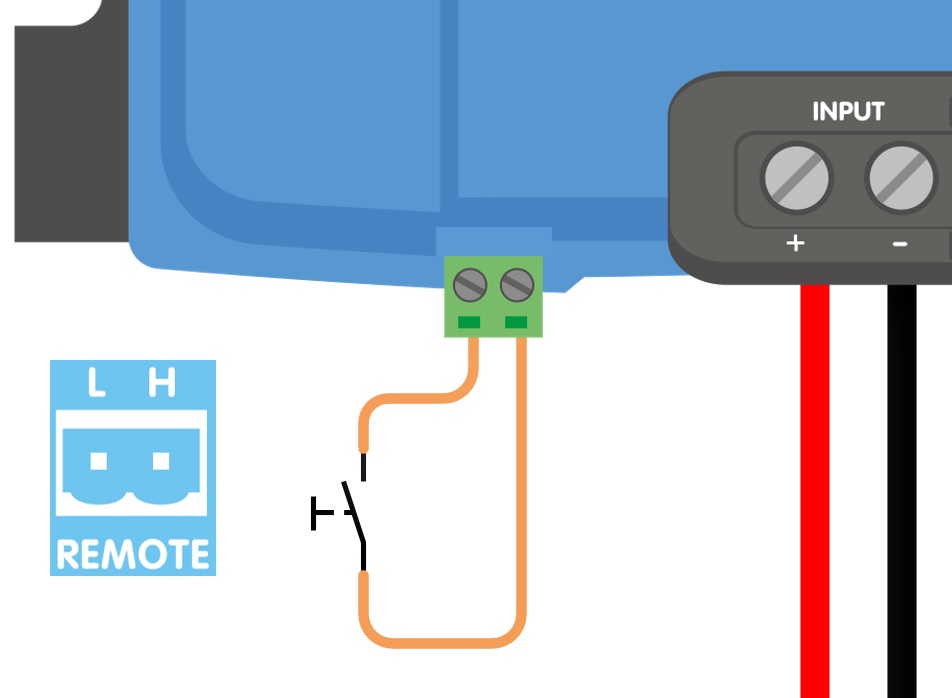 | 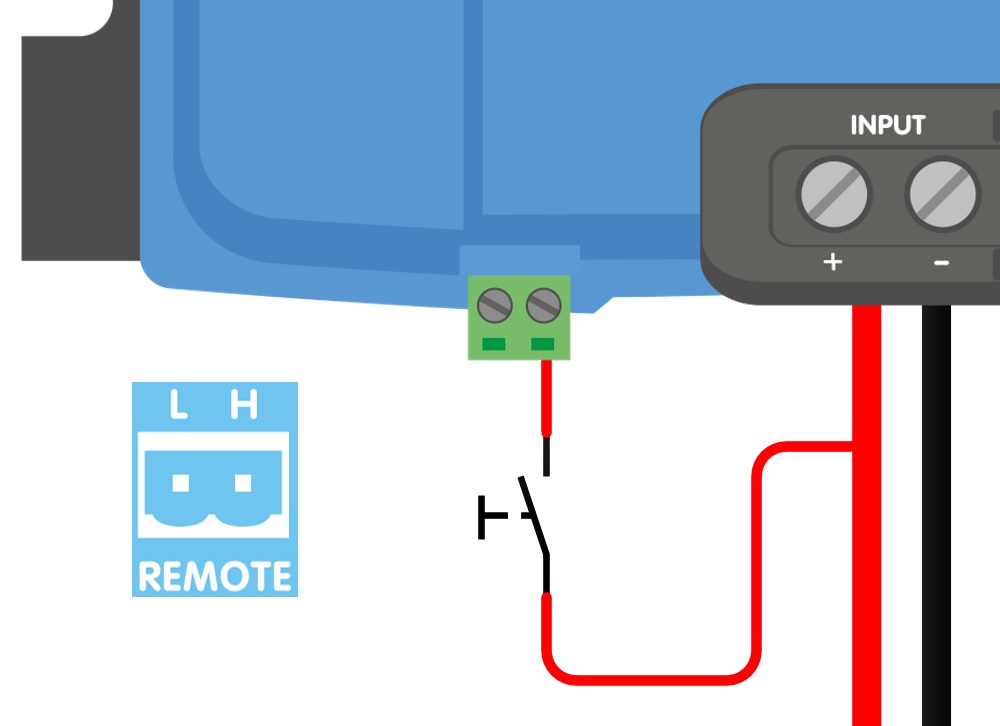 | 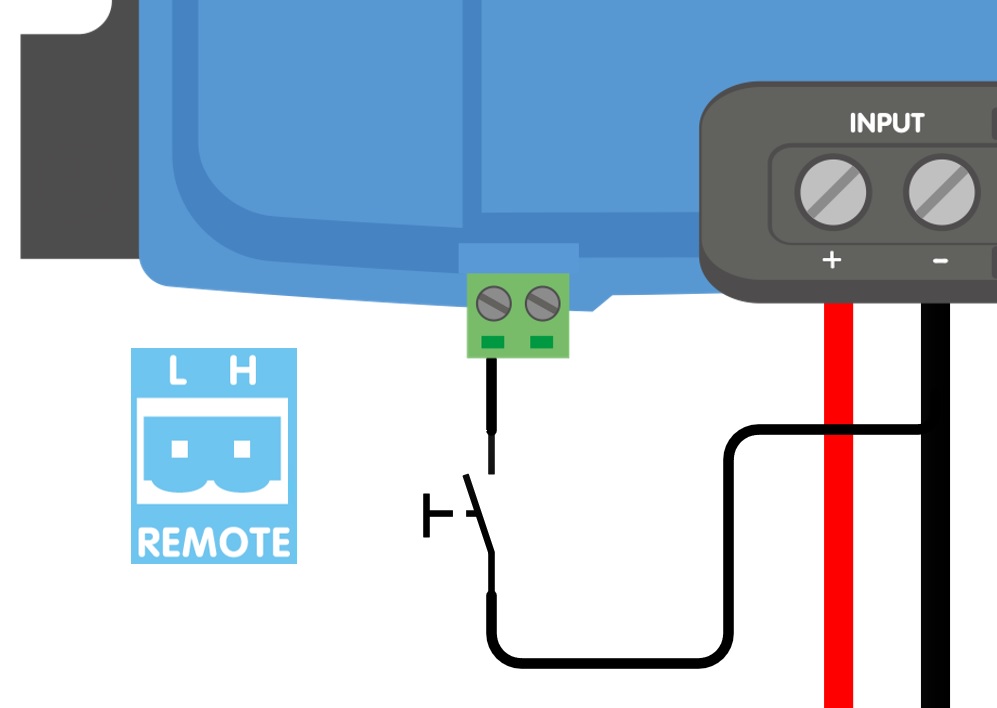 | |
d) Isolated remote on/off cable | |||
| |||
Figure 3: Remote on/off connections | |||
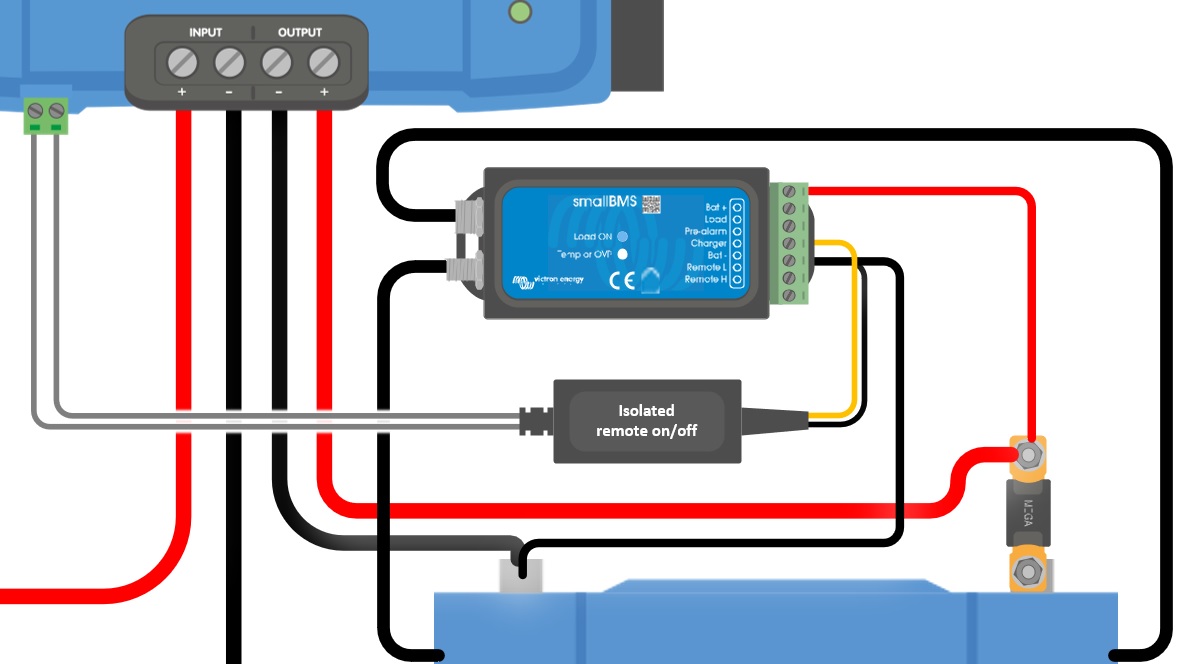
The is on when at least one of the following conditions is met: the L- and H-pin are interconnected, either by the wire loop or by a switch (option a), the H-pin is pulled to battery plus (option b), the L-pin is pulled to battery minus or ground (option c), or an external device controls the remote input (option d). If none of these conditions is met, the unit is off.
Option a) is the simplest: a plain switch or relay contact, with no connection to the battery poles. Options b) and d) suit installations where a switched positive signal is available, such as a BMS charge control (ATC) contact. Option c) suits installations where a switched negative signal is available, for example a signal switched to the chassis of a vehicle. Option c) cannot be combined with an external engine running signal; see the External engine running signal wiring section.
4.8. External engine running signal wiring
An external engine running signal tells the that the engine is running. See the Using an external engine running signal section for when such a signal is needed and which sources can provide one.
The signal is connected to the L-pin of the remote connector. Applying >7V to the L-pin overrides the engine shutdown detection and activates the charger, even when engine shutdown has been detected.
Note
The remote on/off circuit of the is referenced to the input battery (e.g. the starter battery). The input and output circuits are galvanically isolated and do not necessarily share the same negative. The signal must therefore come from the input battery side; a signal referenced to the output (auxiliary) battery will have no effect.
Notice
This function does not override or replace the remote on/off function. The must be switched on via remote on/off for the signal to have effect. This can be the wire loop fitted on delivery, or remote wiring options a), b) or d) as shown in Remote on/off wiring. Option c) cannot be combined with an external engine running signal: both use the L-pin, and connecting the signal to an L-pin that is switched to ground would cause a short circuit. See the examples in Figure 4.
Enable charging with an ignition switch and remote on/off option a) |
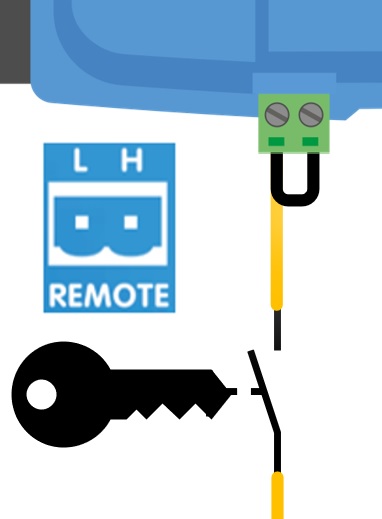 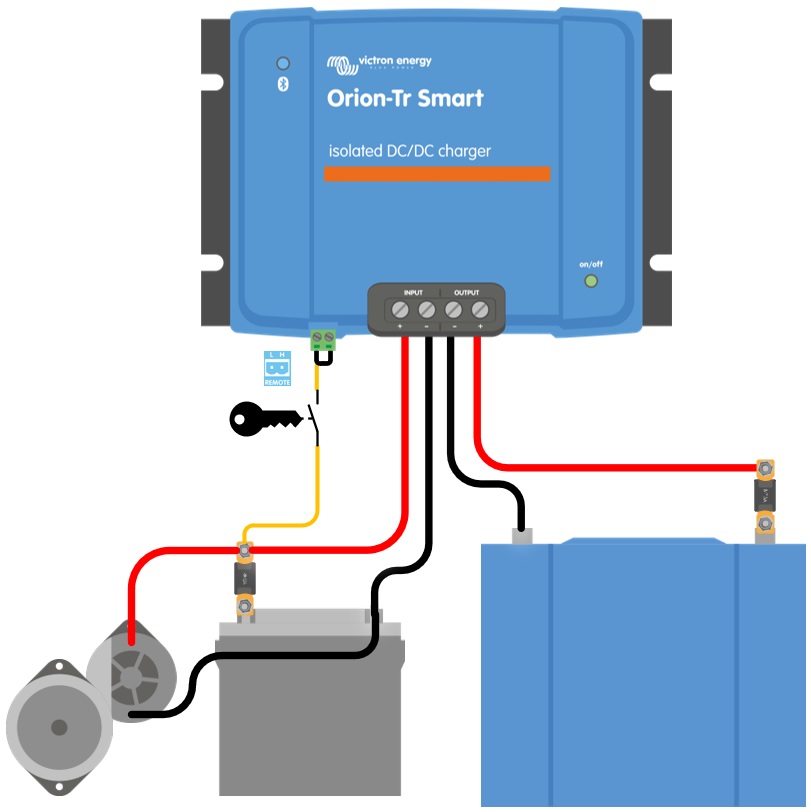 |
Enable charging with an ignition switch and remote on/off option d) |
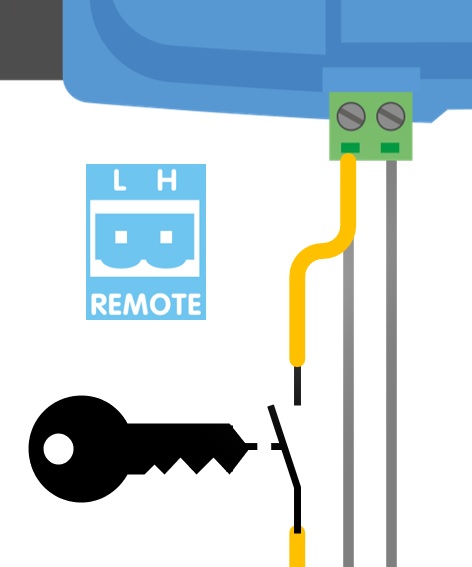 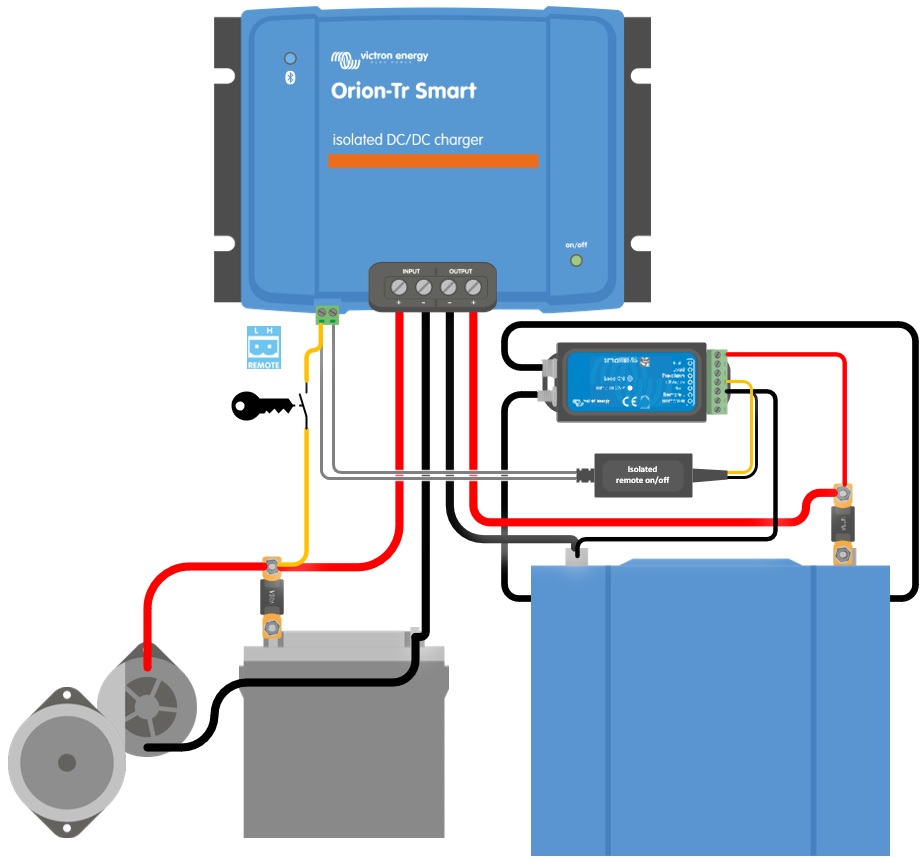 |
Figure 4: External engine running signal connection diagram
Wiring a signal that is pulled to ground
Some vehicles provide an engine running signal that is pulled to ground (battery minus) while the engine is running, and is open circuit while the engine is off. This is the opposite of what the L-pin expects, so the signal cannot be connected to the L-pin directly. Use a relay to convert it:
Connect the relay coil between a fused supply from the starter battery positive and the vehicle's engine running terminal.
Connect the normally open relay contact between a fused supply from the starter battery positive and the L-pin.
While the engine runs, the vehicle terminal pulls the relay coil to ground, the relay energises and the contact applies >7V to the L-pin. When the engine stops, the vehicle terminal opens, the relay releases and the signal on the L-pin is no longer present.
Note
Engine running terminals in a vehicle can typically only sink a small current. Use them to drive the relay coil only, never a load. Use a relay with a built-in suppression diode across the coil, or fit one, to protect the vehicle electronics. Consult the vehicle manufacturer's documentation for the availability and ratings of such a signal.
Note
Leave the engine shutdown detection enabled in the VictronConnect App when an external engine running signal is used; see the Using an external engine running signal section.